
I'm working on getting an i5 Mac mini to display to an LG 4K tv for a studio we're building at the office. I bought a Club 3D mini DP to HDMI adapter and downloaded/bought SwitchResX to unlock and utilize the higher resolutions and refresh rates. I can get the highest resolution and frame rate combination to work through SwitchResX, but as soon as I reboot the Mac Mini, after the Apple logo loading bar screen passes, the screen flickers and flashes green. I then have to unplug the HDMI cable from the adapter and plug it directly into the Mac Mini which then displays the Mac's desktop. I can then plug it back into the adapter to take advantage of the SwitchResX resolution for 4K. I've scoured different forums to no avail. Has anyone seen anything similar? Any help is appreciated.
Mini DP - HDMI i5 Mac Mini SwitchResX 4K Start Up Issues. Anyone else see this?
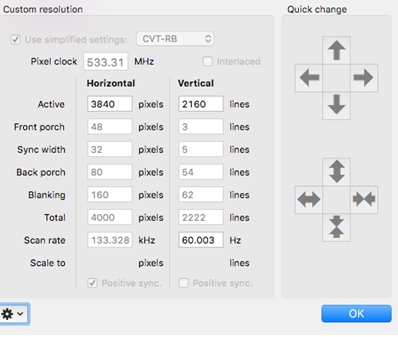
I tried this and it made it so that it always flashed green whenever I plugged in the tv through the adapter. Once I deleted the custom resolution configuration and rebooted, the green flashing only happens on start up. I can then switch to the HDMI port and then switch back and I don't get the green flash after boot up.
Hi jefftv,
It sounds like the system does not recognise the screen and chooses to send out a signal the screen does not "like" at boot up. After you change settings all is fine, until next boot.
Normally an app like SwitchResX would solve that becuase it overwrites the normal system setting and "forces" the sytem to output whatever you want. That his does not function after boot, it a new one for me.
What firmware is on the adapter (should be mentioned on the label on the cable).?