
unable to get more than 3840x2160 @ 30Hz going on a Macbook Pro 15 that has the nvidia 750 graphics option through the DP 1.2 to HDMI 2.0 active adaptor (CAC--1170). Tried with a bunch of different HDMI 2.0 (marketed) cables , it pretty much the same output i get from the hdmi port on the mac .
Any help on this regard would be appreciated .
CAC-1170 not working with Sceptre U435CVU and mid 2014 mac book pro 15
Hi Vishal,
Here's my standard checklist:
* Color Depth (often default set to 16 bits or even 32 bits) need to be set to 8 bits (when running 4:4:4).
What are the 4K formats supported by the adapter ?
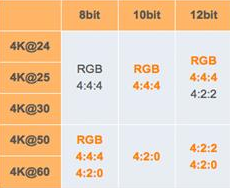
* Make sure the HDMI cable you are using can do HDMI2.0 or 18Gbps.
Sound a bit “easy” but many cable do actually not support the full bandwidth, certainly not cables longer than 3 meters …
* On many TV’s you need to turn on "UHD Color" or “Advanced (Color) Setting” manually in the settings of your TV for the HDMI port to which your pc is connected.
* Also it could help when connecting 2 screens, to set the screen connected thru the Adapter as second/secondary screen
* I strongly advise you to make a custom resolution, set resolution to 3840x2160 at 60Hz and set Timing standard to CVT-RB (reduced blanking)
Thanks for the feedback . Unfortunately no luck in getting it to work.
HDMI cable is from amazon basics and rated at 18Gbps HDMI 2.0 , tried with other cables i had lying around (xbox One ) and there is no difference.
using SwitchResX does not meet minimum security guidelines to install on a macbook pro ( as the App has no App Store account ) and is merely a binary distribution over the internet.
Using this adaptor with a HDMI 2.0 screen for the Mac OS X El Capitan is definitely a problem ( even if the MacBookPro is capable of 4k@60 through the DP ) .
it is a setting problem . Got it to work with 2013 intel HD 4400 (dell xps 13 - i7 4500U) with 3840x2160@50 Hz ( the 4400 max is 3200x2000@60Hz if i remember correctly).
Thank you for the prompt response and helpful feedback .