Firmware CAC-1070

12 replies

Hello, I just purchased a CAC-1070 DP1.2 to hdmi 2.0 adapter.  I don't have it yet but it will go from a Strix 390 to a Samsung JS9000 4K.  I keep hearing in the forums and other sources about firmware for the adapter.  What is the purpose of the firmware, is it recommended to keep the firmware up to date, should I get the firmware, and where do I get it and how do I install it?

Thanks!

Hi Kahless, the biggest update in the last firmware (compared the the version that your Adapter will have) has to do with reading EDID info  coming from TV's. This could be a problem mainly with Vizio tv's. I do not expect you to need the firmware update looking at your hardware.

Here's my standard checklist:

* Color Depth (often default set to 16 bits or even 32 bits) need to be set to 8 bits (when running 4:4:4).

What are the 4K formats supported by the adapter ?
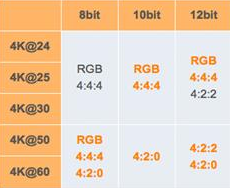
* Make sure the HDMI cable you are using can do HDMI2.0 or 18Gbps.

Sound a bit “easy” but many cable do actually not support the full bandwidth, certainly  not cables longer than 3 meters …

* On many TV’s you need to turn on "UHD Color" or “Advanced (Color) Setting” manually in the settings of your TV for the HDMI port to which your pc is connected.

* Also it could help when connecting 2 screens, to set the screen connected thru the Adapter as second/secondary screen

* I strongly advise you to make a custom resolution, set resolution to 3840x2160 at 60Hz and set Timing standard to CVT-RB (reduced blanking)

Thanks for the reply.  Sounds like I don't need to worry about the firmware unless I have a problem?

My cable will be fine as I have tested it on a separate Titan X system I have, and it of course has the Hdmi 2.0 port and does 4:4:4 60hz 4k just fine with my cable.  So I would suspect the adapter will work fine with my 390 out of the box then on the Samsung JS9000.

HMDI cable good, adapter good, TV good ... i don't see a problem :-)

Is there any chance that firmware could transform the EDID information so we don't have to define custom resolutions with CVT-RB?  

I'm using a second adapter on a new TV and am trying to avoid buying the utility required to do so on the Mac since my trial expired.

You don't "have to" use CVT-RB setting, we have only noticed that in many cases that gives the best result when end-users connect their TV.

by the way i know that many Mac users used SwitchResX to make custom resolutions and i am quite sure that is for free ...

SwitchResX is $15... But the 10 day trial works well enough until you want to connect the computer to a different hdmi 2.0 device later. I went ahead and bought it. Not a big deal.

I don't know anything about Mac's but doesn't your drivers for your graphics adapter include some sort of custom resolution ability?  Seems strange that you would have to purchase something to do that.

how do you think Apple got so rich ;-)

Apple isn't making money on switchresx, it's not even in the App Store. But Apple has the philosophy of not implementing features that they don't think people need to keep the software easier to use and not lean. Where I work out UX department has embraced this and it works out very will most of the time.

Frankly his is why Apple is so rich, but not because of greed.

no offence intended, just joke (hence the winky)

Log in to reply or create an account