Hi All,
Please check this ... For some Sony TV you need to do some settings in the TV liek this:
For Sony TV you often need to enable “Enhanced Mode” in the settings of the TV and please also check you are using the correct HDMI input.
Use either 'Game' or 'Graphics' mode, and then go to 'Settings -> 'External Inputs' -> 'HDMI Signal Format' and choose 'Enhanced.'
Checklist:
* Make sure the HDMI cable you are using can do HDMI2.0 or 18Gbps.
I know it sounds a bit “easy” but many cables do state to support 4K but actually do not support that in 60Hz and/or the full bandwidth, that certainly goes for cables longer than 3 meters. It is always best to go for a certified cable, something like this http://www.club-3d.com/index.php/products/reader.en/product/hdmi-20-high-speed-4k60hz-uhd-cable-.html
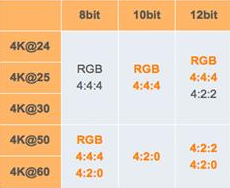
* On many TV’s you need to turn on "UHD Color" or “Advanced or Enhanced” setting manually in the settings of your TV for the HDMI port to which your pc is connected.
* Also it could help when connecting 2 screens, to set the screen connected thru the Adapter as second/secondary screen
* I advise you to make a custom resolution, set resolution to 3840x2160 at 60Hz and set Timing standard to CVT-RB (reduced blanking)
* Color Depth need to be set to 8 bpc (when running 4:4:4).