• All
  • Members Lounge
  • USB Type C
  • Docking Station
  • MST Hub
  • USB Graphics
  • Adapters and Cables
    • DisplayPort 1.4 to 4K120Hz HDMI Adapter
  • Graphics cards
    • R9 Series
      • R9 Fury Series
      • R9 390 Series
      • R9 380 Series
      • R9 290 Series
      • R9 280 Series
      • R9 270 Series
    • R7 Series
      • R7 300 Series
      • R7 260 Series
    • R5 Series
    • Others
    • HD 7000 Series
  • Technology
  • Market Place
    • Hot Deals
    • For Sale or Trade
  • Warranty questions
  • Never Settle Campaign
  • News

Club 3D Insights

  • Unfollow
  • Follow
  • Profile
  • Logout

CAC-1010 not working

Updated on 22-07-2023 in Adapters and Cables.
  • Close
  • Delete
4 0 on 16-04-2020
Dr4gneel8055

Hey ya all, i need help with the CAC-1010 i was shipped today. I have a Benq Zowie XL2411 and a new graphics card. the rx 5700 xt sapphire nitro+ SE. The only way i can have 144hz is this adapter… but when i switch from 59hz to 144hz it still stand on 59 hz.

i dont know why. i already used the second DP Port from graphics gard.


HELP pls.

Insert Image Size must be less than < 5MB.
Save Cancel
Reply
1 0 on 17-04-2020
CLUBBIE

Hello,

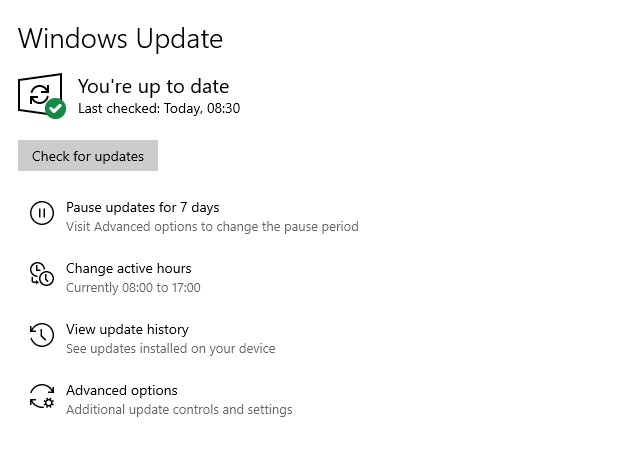
First of all is your windows completely up-to-date?

as seen on the picture below.


Do you have the newest AMD drivers installed? are you using the AMD software to determine the output resolution or the integrated Win 10 graphic display settings?


Insert Image Size must be less than < 5MB.
Save Cancel
Show more replies
0
Dr4gneel8055

it now works but not that fine. in cod i got my 160+ fps and 144hz but in games like division 2 where i have 150 fps the adapter dont want to go to 144hz. when i start division 2 or rainbow six siege, the display is black and after 10 seconds again black and again. after the 3 times of blackness its on 60hz

Reply
Reply Cancel
0 0 on 20-04-2020
CLUBBIE

Hi,

This sounds like a software issue with the game not with the adapter, since the adapter does not make a selection on output by itself.

This problem is however a much occurring and lays with AMD.

https://community.amd.com/thread/242788


Insert Image Size must be less than < 5MB.
Save Cancel
Show more replies
Reply
Reply Cancel
0 0 on 22-07-2023
jathamlewis

I tried with Power Warriors and nothing happened @Dr4gneel805

Insert Image Size must be less than < 5MB.
Save Cancel
Show more replies
Reply
Reply Cancel
Login to Reply
Insert Image Size must be less than < 5MB.
Reply Cancel
  • All Posts
  • Following Posts
  • Blog
Copyright 2025 Club 3D B.V.