• All
  • Members Lounge
  • USB Type C
  • Docking Station
  • MST Hub
  • USB Graphics
  • Adapters and Cables
    • DisplayPort 1.4 to 4K120Hz HDMI Adapter
  • Graphics cards
    • R9 Series
      • R9 Fury Series
      • R9 390 Series
      • R9 380 Series
      • R9 290 Series
      • R9 280 Series
      • R9 270 Series
    • R7 Series
      • R7 300 Series
      • R7 260 Series
    • R5 Series
    • Others
    • HD 7000 Series
  • Technology
  • Market Place
    • Hot Deals
    • For Sale or Trade
  • Warranty questions
  • Never Settle Campaign
  • News

Club 3D Insights

  • Unfollow
  • Follow
  • Profile
  • Logout

Two 27″ inch monitors on CSV-1564w100

Updated on 04-11-2022 in Docking Station.
  • Close
  • Delete
11 0 on 03-08-2022
Temmink6

Hello all,

I’ve got the follow problem. I cannot seem to get my csv-1564w100 to work with my two Dell U2715H monitors in conjunction with my laptop screen.

The two monitors should ideally work on a resolution of 2560×1440. The laptop monitor operates on 1920×1080.

Monitor 1 is connected to the DP port of the dockingstation and I am able the set this screen to 2560×1440.
Monitor 2 is connected to the HDMI port and is limited to 1920×1080.

I cannot find any firmware or drivers to update on this dockingstation.
According to the specifications the dockingstation should support 4K on both ports, if I understand correctly. Still my suspicion is that in conjuction with my laptop screen this is not supported.

Can someone tell me how to solve this, maybe even with another product?

Insert Image Size must be less than < 5MB.
Save Cancel
Reply
0 1 on 04-08-2022
Baak

The CSV-1564W100 does support on both port up to 4K/30Hz but not at the same time. SST mode means Single Stream, Single as in 1 display.

Connecting 2 displays the max should be 2x 1080p/60Hz.

I would suggest the CSV-1597 it supports up to 2x 4K60Hz but that comes without any power supply.

Or the CSV-1566 that does comes with a power supply, but uses DisplayLink and USB-C Alt mode at the same time.

Insert Image Size must be less than < 5MB.
Save Cancel
Show more replies
Reply
Reply Cancel
0 0 on 04-08-2022
Temmink6

Clear, thank you!

Insert Image Size must be less than < 5MB.
Save Cancel
Show more replies
Reply
Reply Cancel
8 0 on 02-11-2022
DRZ077

I have just purchased the same unit (CSV-1564W100) and my msi laptop will only allow 1080p on 1 of 2 Asus monitors, one is connected to hdmi and the other is connected via display port. According to the specs advertised shouldn’t I be getting 1080p on both?

Insert Image Size must be less than < 5MB.
Save Cancel
Show more replies
0
Baak

That is correct it should give you 2x 1080p60Hz . What Hz have you selected with the first display which does give you 1080p? What resolution do you have with the second display?

Which MSI laptop are you using? Prefer a link to the exact make/model.

0
DRZ077

Thanks for the response, my computer is a MSI prestige 15 A11x.
the refresh rate for the first display is set to 60hz

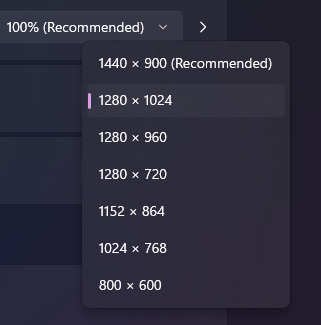
the resolution for the second display is max available in windows setting I believe is at 1280×720 I can double check when I get to my office


0
Baak

The notebook should not be the issue, seeing it supposedly have a TB3(?) port.

When your are back in the office, could you check what cables you are using?

Does the DP give 1080p or the HDMI?

Could you also check which colors are used? RGB 420 442 444?

Thinking out of the box, what happens if you lower the resolution of the laptop to 720p?

0
DRZ077

The first image shows what display options are available for the second display.

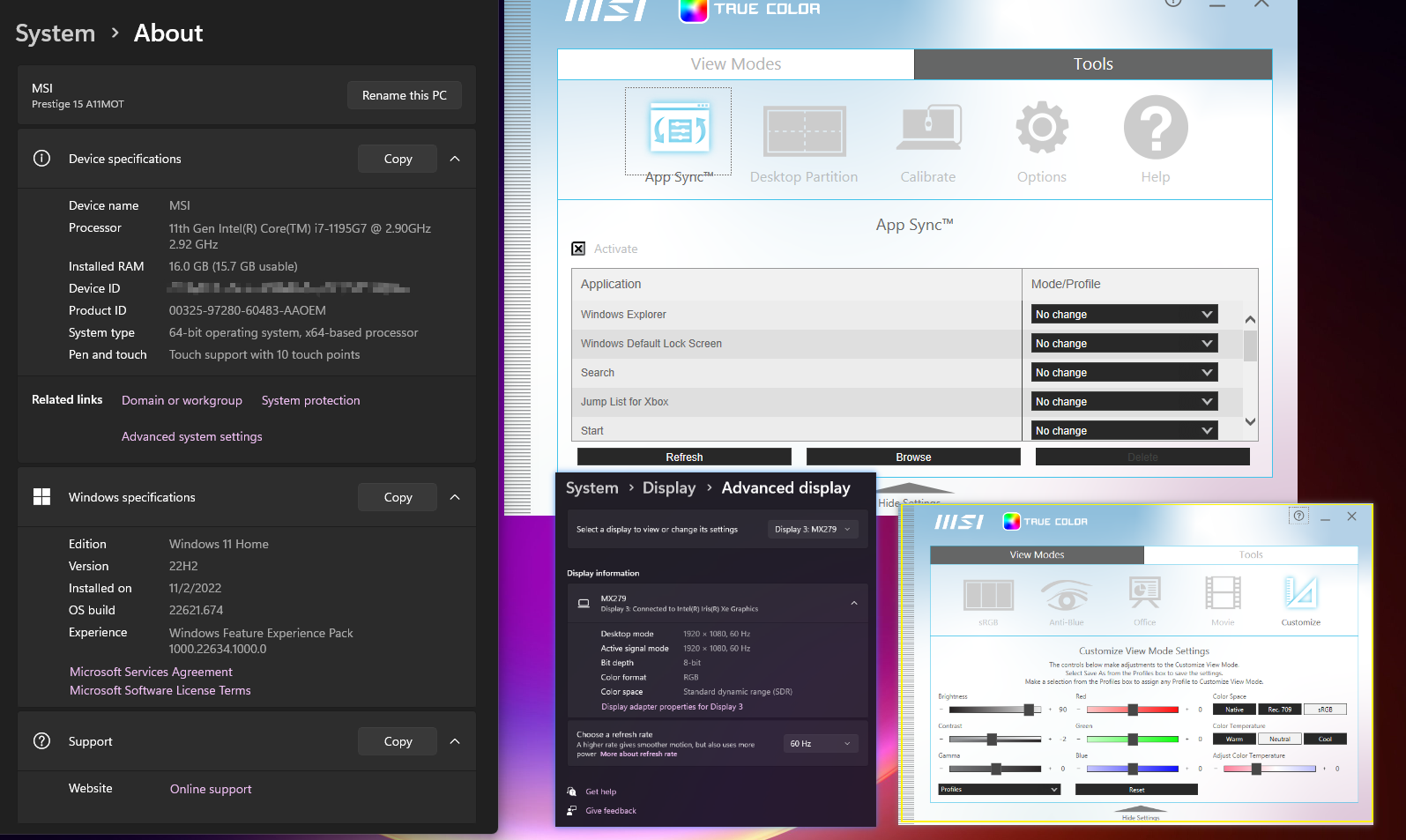
The next image shows my system, windows color settings, and if color is a factor perhaps the MSI color settings are interfering.

The cables I am using are.

  •  A brand new DP to HDMI adapter cable
  • Two different existing HDMI cables which both worked on my HDMI port in the laptop and both worked to deliver dual 1080p on my old dock (visionTek 901005) {the only reason I upgraded to this dock is my new PC supports Thunderbolt power delivery}.

Changing the laptop display to the lower resolution had no effect, but good idea.

The DP gives the 1080, the HDMI on it’s own was giving 1080 yesterday, now it won’t at all through the dock. Currently with HDMI direct to PC and DP connected via the dock I am able to get 1080 on all three. But sure takes away from the single cord dock feature I was excited for. 

I can also confirm this MSI PC is equiped with two Thunderbolt ports.

Thanks for you help.

0
DRZ077

*Update

Connected second display via VGA and now have 1080p on all three through the dock! Yay!

0
Baak

Great that it works!

I mostly discourage the use of any adapter on a docking station. 

But happy it works 😀

0
DRZ077

I agree with the idea not to use adaptors but glad it works too. 

Have you any idea why the power delivery is not working today, and was working yesterday?

0
Baak

I have no idea it should simply work if you have both USB-C Cables connected.

Orange to the dock (with the red lined USB-C cirle) and a charger and the black one from dock (underneath) to your laptop it should charge.

Have you checked the power settings of the USB?

Reply
Reply Cancel
Login to Reply
Insert Image Size must be less than < 5MB.
Reply Cancel
  • All Posts
  • Following Posts
  • Blog
Copyright 2025 Club 3D B.V.