• All
  • Members Lounge
  • USB Type C
  • Docking Station
  • MST Hub
  • USB Graphics
  • Adapters and Cables
    • DisplayPort 1.4 to 4K120Hz HDMI Adapter
  • Graphics cards
    • R9 Series
      • R9 Fury Series
      • R9 390 Series
      • R9 380 Series
      • R9 290 Series
      • R9 280 Series
      • R9 270 Series
    • R7 Series
      • R7 300 Series
      • R7 260 Series
    • R5 Series
    • Others
    • HD 7000 Series
  • Technology
  • Market Place
    • Hot Deals
    • For Sale or Trade
  • Warranty questions
  • Never Settle Campaign
  • News

Club 3D Insights

  • Unfollow
  • Follow
  • Profile
  • Logout

CAC-2170 60 Hz

Updated on 19-04-2018 in Adapters and Cables.
  • Close
  • Delete
2 0 on 29-01-2018
Theremin

I’m trying to get 60 Hz working with LG 75UH5C. I have connected a MacBook Pro 2015 model with CAC-2170  and a high quality cable but can only get 30 Hz.

The same cable and display works with CAC-1070, so there has to be something wrong with the adapter. What could be the issue, perhaps a firmware update for the adapter is needed?

Insert Image Size must be less than < 5MB.
Save Cancel
Reply
0 0 on 29-01-2018
MST1407

Good day Theremin,

The CAC-2170 has the same chip inside as the CAC-1070 and is already loaded witht eh latest “0.55” or “V7.55” firmware.

  • Setup

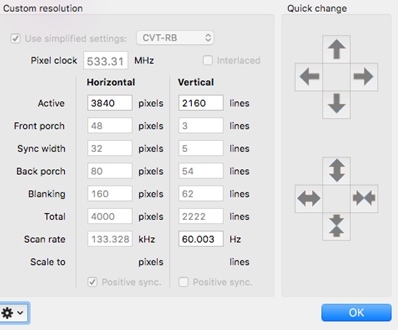
Setups with TV’s normally work best by making a custom resolution, in this case for: 3840*2160 at 60 Hz with Timing Standard set to CVT-RB (Reduced Blanking).

(For setups with Monitors Timing Standard can remain on “auto”.)

On most TV’s you will need to do some settings like “Enhanced Mode”/ “PC-Mode” and/or “UHD Color” for the HDMI 2.0 port in use. 

Please make sure the HDMI port of the Screen/TV supports 4K 60 Hz, often not all HDMI inputs support that.

  • Custom Resolution

To be able to generate such a Custom Resolution you will probably need an app like SwitchResX since MAC OS does not provide such settings.

Should be something like this, please do make sure to have it set to “CVT-RB”


Insert Image Size must be less than < 5MB.
Save Cancel
Show more replies
Reply
Reply Cancel
0 1 on 01-02-2018
Theremin

Ok, I’ll have to try with another computer to verify. The cable and screen are capable since they work on another computer with CAC-1070.

Insert Image Size must be less than < 5MB.
Save Cancel
Show more replies
Reply
Reply Cancel
Login to Reply
Insert Image Size must be less than < 5MB.
Reply Cancel
  • All Posts
  • Following Posts
  • Blog
Copyright 2026 Club 3D B.V.