• All
  • Members Lounge
  • USB Type C
  • Docking Station
  • MST Hub
  • USB Graphics
  • Adapters and Cables
    • DisplayPort 1.4 to 4K120Hz HDMI Adapter
  • Graphics cards
    • R9 Series
      • R9 Fury Series
      • R9 390 Series
      • R9 380 Series
      • R9 290 Series
      • R9 280 Series
      • R9 270 Series
    • R7 Series
      • R7 300 Series
      • R7 260 Series
    • R5 Series
    • Others
    • HD 7000 Series
  • Technology
  • Market Place
    • Hot Deals
    • For Sale or Trade
  • Warranty questions
  • Never Settle Campaign
  • News

Club 3D Insights

  • Unfollow
  • Follow
  • Profile
  • Logout

CSV-1568 problems with Probook 460 and thinkbook 16 (Both Core5 Ultra)

Updated on 02-02-2026 in Docking Station.
  • Close
  • Delete
17 0 on 19-03-2025
fhaarhuis

We are experiensing a lot of problems with the CSV-1568 Dock. We sold about 40 pieces together with Probook 460 (ultra5) and thinkbook 16 (ultre5). Both notebooks (different production batches) experience the same problem:

when starting the notebook with dock including power adapter in the dock: usb and network are not working, and the notebook reacts slower. 

when starting the notebook witt dock EXCLUDING power adapter in the dock: All works fine. Poweradapter can be added…. no problems

We cannot ask all customers to detach and attach the adapter at every powercycle.

Does anyone experience the same problem?

Kind regards, Frank
Insert Image Size must be less than < 5MB.
Save Cancel
Reply
5 0 on 25-03-2025
Baak

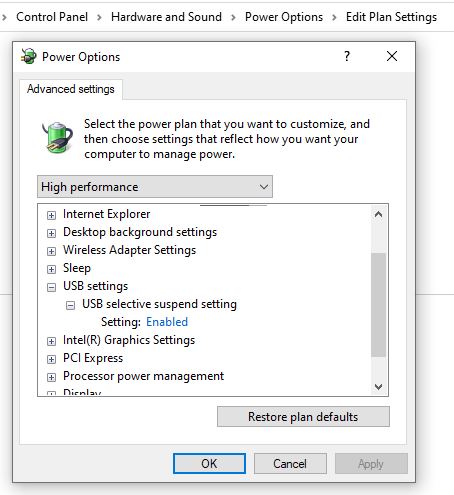
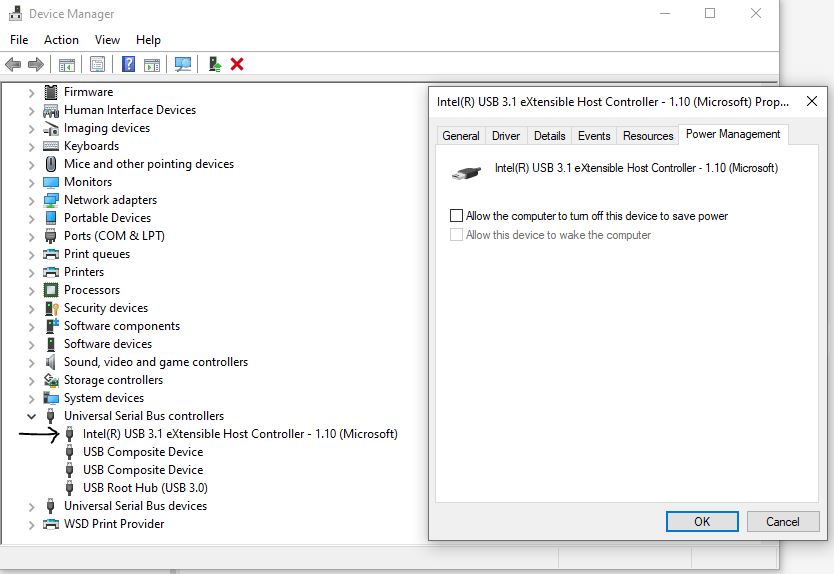
Sometimes there are powersaving settings enabled on USB ports from the source (laptops). Could you check and disable those?

Insert Image Size must be less than < 5MB.
Save Cancel
Show more replies
0
fhaarhuis

The problem is already there at startup of the notebook.

These settings had allready been changed. Strange thing is that the dock functions perfectly without the power adapter connected at startup. Connecting the power adapter afterwards also functions well. So we think there is a problem with the Dock in combination with notebooks havin a net Core Ultra Processor. We also mentioned this to Wiktor of Club-3D. 

The following things are connected to the dock:

2x 24″ fhd screens / logitech unify adapter / network cable 

0
Baak

Ok that’s clear, I don’t know what has been discussed with Wiktor, I’m just a passerby 🙂

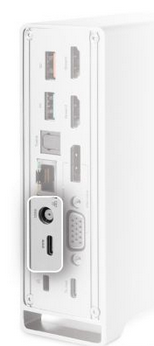
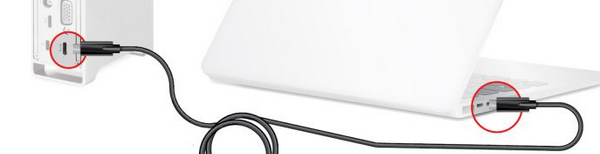
When the power is connected, is there anything connected to the lower USB-C too (Pic A)?  If yes, disconnect that. Is the host connected as Pic B?

Pic A:

Pic B:

0
fhaarhuis

initially we used the power supply which was send with the dock. 

Host is connected to the “To Host” connector (pic b)

We also tried a usb-c powersupply which we connected to the usb-c connector on pic A

Both same result

0
Baak

Is there any other power source connected to the notebook?

0
fhaarhuis

no


Reply
Reply Cancel
2 0 on 28-03-2025
Wiktor

We are actively working on this issue. Based on our findings, newer HP laptops use a different voltage control method on the USB-C communication line compared to the rest of the industry. This is causing the chipset in our docking station to fail to initialize correctly.

We have already contacted the chipset manufacturer, who has ordered HP laptops for testing. They are currently working on a firmware update that should resolve the issue without requiring any changes from HP. We expect to receive an update on this topic the next week.

We will keep you informed as soon as we receive further details. Please let us know if there are any additional concerns in the meantime.

Best regards,
Wiktor
Club3D

Insert Image Size must be less than < 5MB.
Save Cancel
Show more replies
0
stoopid

I’ve subscribed to this thread.  We have many Club3D dock across multiple clients using newer HP laptops with second (and third) screen flickering and disconnect issues.  The rate of frequency increased tenfold when we switched them from the older HP branded docks to the Club3D a couple years ago.  Hoping this finally being resolved means a firmware is made available to all of us, and soon.

0
fhaarhuis

We also experience these problems….. next to the already mentioned issue….. 

Customers are getting really pissed………

Reply
Reply Cancel
3 0 on 25-04-2025
Wiktor

We have a new firmware that solves this problem, please contact support if you are still experiencing problems.

Insert Image Size must be less than < 5MB.
Save Cancel
Show more replies
0
stoopid

We have a new firmware that solves this problem, please contact support if you are still experiencing problems.

From Wiktor

The only contact for club3d support is their RMA email address, which I emailed earlier.  Is this the best method?  Can this not be provided via a link on the club3d website?

1
joevt

The email address is at https://www.club-3d.com/en/info/6/contact/
which says [email protected]

0
stoopid

Unfortunately the dock firmware Wiktor provided did not help with screen disconnects or flickering with the two HP EliteBook 860 16 inch G9 Notebook PC laptops we tested.  I’m in direct contact with them through email, just figure I’d mention it’s not working for all.

Reply
Reply Cancel
2 0 on 06-05-2025
fhaarhuis

We installed the new firmware….. So far so good

No more unstable dock and no more flickering screens….

Please put the firmware on de site as a download.

Kind regards Frank


Insert Image Size must be less than < 5MB.
Save Cancel
Show more replies
0
stoopid

Wiktor, as you see in this customer’s reply there’s another example of ‘flickering screens’.  [Wiktor pretended privately that our flickering screen issue was unusual or unique]

This reply is one reason I was hoping the firmware would help address our intermittent display issues.

0
Wiktor

We spoke to other people who had experienced this problem. The pattern was always the same: video up, data down. There was no screen flickering.
Flaarhuis, could you confirm whether your problems included screen flickering?

Reply
Reply Cancel
Login to Reply
Insert Image Size must be less than < 5MB.
Reply Cancel
  • All Posts
  • Following Posts
  • Blog
Copyright 2026 Club 3D B.V.