NO TRUE RGB(4:4:4) with 4k@60Hz -DP1.2 to HDMI2 (CAC-1070), GTX760, SAMSUNG UE43KS7590UXZG

12 replies

Hi there,

I bought your adapter to connect my PC to my new 4k TV and run it with 4k@60Hz with RGB(4:4:4).
Unfortunately, if I just go to the Nvidia Panel and setup my resolution to 3840x2160 and 60Hz, my TV goes white with a flicker at the bottom end.

So I created a manual resolution with the following setup:
http://imgur.com/a/2NlbH

Its the only configuration that will work 4k at 60Hz, but when I open my test picture to confirm 4:4:4, it will show the compression of 4:2:2 or worse, even when it shows RGB in the Nvidia Panel.

If I run normal HDMI 1.4 4k at 30Hz and RGB, everything looks brilliant.

What am I missing?
Why cant I have 4k@60Hz@RGB(4:4:4)?

--------------------------

My Setup:

My Adapter
http://www.club-3d.com/index.php/produkte/leser.de/product/displayport-12-to-hdmi-20-uhd-active-adapter.html
REV A3-00
FW: V7.26
1635

My TV - I turned on UHD for HDMI2 (PC)
http://www.samsung.com/de/consumer/tv-av/tv/quantum-dot-display/UE43KS7590UXZG

My GPU
<a href="https://de.msi.com/Graphics-card/N760-TF-2GD5OC.html#hero-overview">https://de.msi.com/Graphics-card/N760-TF-2GD5OC.html#hero-overview

My Driver
Original Nvidia 375.95

My OS
Windows 10 Pro, All Updates

My Cable

HighSpeed HDMI Cable 18Gb
https://www.amazon.de/Vivanco-PRO-14HDHD-25PB-R%C3%BCckkanal/dp/B00…

Test Picture to test 4:4:4 and Confirmed compatibility of TV
http://imgur.com/a/M0Wtf

please check if  the BPC is set to 8Bits

when i check the link you send for the HDMI cable i get this cable ..."Vivanco PRO 14HDHD 25PB High Speed HDMI Kabel mit Ethernet (Audio Rückkanal ARC 2,5m) blau/schwarz"

At the specs it states 4k up to 24Hz ... perhaps the link is wrong ? 

Hi there, thats indeed weird... the one who sold it to me said it would be 2.0b - I will have a HDMI 2.0 cable by tomorrow, then try it again. Will report back then, thank you for pointing out the cable so far.

I tested this 40euro cable from oehlbach
https://www.amazon.de/Oehlbach-Shape-High-Speed-HDMI%C2%AE-Kabel-Ethernet-schwarz/dp/B009B2LJSA/ref=sr_1_1?ie=UTF8&qid=1480021023&sr=8-1&keywords=shape+magic+220

in addition i also tested an amazon hdmi2.0 cable, same problems.

http://imgur.com/a/iDLLY

while the tv is running at 60Hz at 4k, the color mode is certainly NOT RGB, even though its displayed as such.
see attached screens...one is your adapter with the 2.0 hdmi cable, the other one is hdmi 1.4 with 30Hz at real RGB. Night and day.

Please advise!

and also the macbook does not work with the oehlbach hdmi2.0 at 60hz and RGB, its really not RGB...i bought the mini DP from you as well to check it...
its 60Hz, but not RGB...
http://imgur.com/a/A4U4l

I don't have Samsung UHD TV but I believe you need to turn on "HDMI UHD color mode".

Like I stated before, I turned on UHD for the HDMI Port.

This aint the issue unfortunately. :(

Could this have anything to do with the TV standard? I think in Europe we use PAL and yesterday with the Macbook I saw NTSC....

You know, just the color aint right now, 60Hz is running fine, but its clearly 4:4:2 colors...you can tell by the compression of the fonts and my test image.

PAL / NTSC should have nothing to do with it in this case.

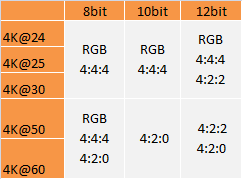
This is what the Adapter supports.


So in 8Bit BPC it supports 3840x2160p At 60Hz in RGB / 4:4:4 ...

With regards to your MAC, you might need to use a program like Switch Res X to make the Custom resolution with CVT-RB timing standard.
For the Windows system. Please un-install the current NVidia Driver and all Grpahics ralted software like Afterburner, GPU-Z or any other similar program. Best to do this in Windows safe mode so the registry can also be cleaned. If your system does not allow you to do that please use program like DisplayDriverUninstaller (DDU).

http://www.wagnardmobile.com/DDU/

Reboot and manually download and isntall latest available driver yourself (don't let any auto installer do that).

Please also check for Bios update for you mainbaord (i knwo it sounds odd, but does often help).

I will also send you email with latest firmware for the Adpater so you can update it on the windows machine (updater does not work on MAC OSx)..

Log in to reply or create an account