
Hi All, I recently brought (Imported - it would be great if Club3D sells its product in India) the Club3D R7-250 card. When I tried to connect multiple displays (4 no's ) with 3 Mini DP to HDMI converters (HDMI compatible displays) and 1 Mini DP to VGA converter (VGA monitor), I noticed only Mini DP to VGA Monitor is detected others are not getting detected. Please let me know what I am doing wrong, Any suggestion would be great. Thank you all.
Mini DP to HDMI Problem in Club3D R7-250.
Hi Aburik,
Welcome to Insights!
In regards to the VGA card I think you have the Eyefinity 4 version. If you do not have DisplayPort displays you can use two passive adapters of any kind and two active adapters to enable the third and fourth display. You can find more information here on our Eyefinity page.
If you have further questions please let us know.
Thanks Paul,
Yes I have Eyefinity 4 version (Club3D Radeon R7 250 Low Profile Eyefinity 4). I normally use dual display for my work. I saw this 4 connector (Mini DP) and thought all four are going to provide display if I convert this display port to my monitor compatible connectors. I am not familiar with the DP adapters. Currently I checked a single MiniDP to VGA (I guess passive connector) converter in all DP port of my graphics card by connecting one by one. It is able to provide the display only the MiniDP to HDMI converters are not working. I have a doubt, If I buy 4 Mini DP to VGA converters and use this card will this provide the simultaneous 4 displays? or please suggest me what are all the adapters I should buy to make this card deliver 4 displays.
Hi Paul,
I have 3 Viewsonic V3D231 monitors and one LG monitor (16M65A - only VGA compatible). I am currently having one MiniDP to VGA converter. both these monitors are not DP compatible but both are working with this converter since I have only one converter I checked them by connecting one by one and also I checked this in all MiniDP ports in Graphics card and found it is functioning. My question is can I buy 4 of this MiniDP to VGA converter (It is cheaper in price) to drive all 4 monitors (3- Viewsonic and 1 LG)? Thank you.
Hi Aburik,
1. Monitor 1 LG Mini DisplayPort to VGA (active) (you already have this)
2. Monitor 2 Viewsonic V3D231 Mini DisplayPort to DVI/HDMI passive adapter
3. Monitor 3 Viewsonic V3D231 Mini DisplayPort to DVI/HDMI passive adapter
4. Monitor 4 Viewsonic V3D231 Mini DisplayPort to DVI/HDMI single link active adapter
Note:
I saw that you have 3D capable displays on the Viewsonic, if you want to use that feature it will mean to increase the bandwidth. In this case from step 2 to 4 you will require Active Dual Link DVI or Active HDMI adapters.
I suggested to use on step 4 a single link active adapter as the display does not exceed 1080p, they are cheaper to buy than the dual link.
I hope this helps.
Thanks Paul, I intend to use this for 2D purpose. Later I am going to replace these monitors with AOC D2367PH (They are good for stereoscopic 3D, Viewsonic supports stereoscopic 3D only with Tridef (Tridef does not support openGL)). so for my configuration can I use 2 MiniDP to VGA active converters and 2 MiniDP to HDMI passive converter. But as I stated earlier I tried using MiniDP to HDMI passive converter it is not working even for single display. I tried connecting single monitor with this converter and started my system, the window boot up screen appears in the monitor and after starting windows it disappears then only MiniDP to VGA is able to provide display.
I tried by connecting single monitor with this converter(MiniDP to HDMI) and starting my operating system, the window boot up screen appears in the monitor and after starting windows it disappears. After this only MiniDP to VGA is able to provide display. I don't know whether it is because of some Driver issue since it is providing the display till windows boot up.
It could be two issues, a adapter/cable that is defective or the second one which is the driver.
Try using this Display Driver Uninstaller to see if you can reinstall the latest driver and everything works well.
If the latest Omega driver is not working well you can always roll back the driver to 14.9 version. It is available at the amd.com site.
Hi Paul, I have attached two pictures with this message. Today I found that miniDP to HDMI passive is working with the graphics card if I don't install the driver (pic1). Once I install the graphics driver (The one comes with the card or the latest omega driver) it works only up to windows booting. If I connect like pic2 (VGA) it works any time (before and after driver installation). If I connect both always only MiniDP-VGA is working other connectors(monitors) are not getting detected.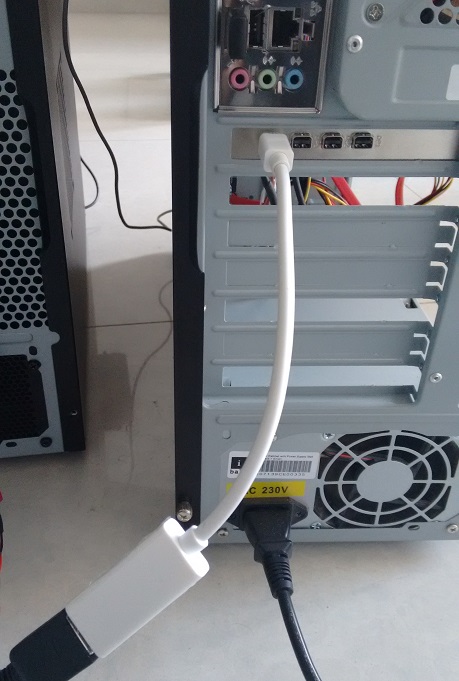
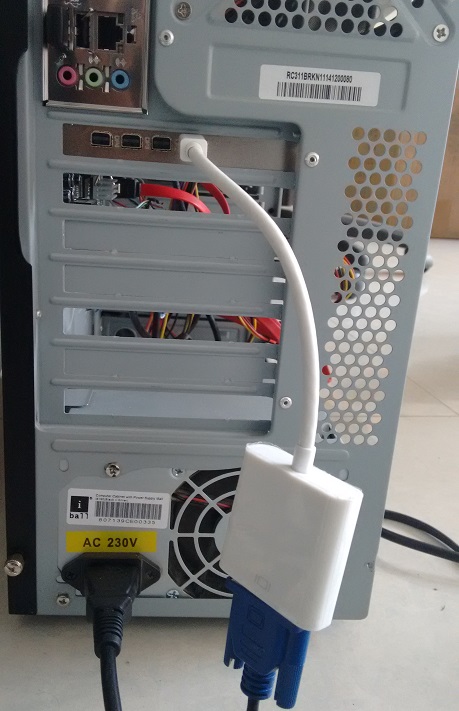
It is not about image, After installing It is not detecting the monitor at all. I Checked this by connecting both VGA and HDMI but it detects only VGA monitor not the HDMI monitor. If I connect only HDMI it is not detecting. In monitor I am getting no signal indication. If I connect VGA then no problem it detects and working. Adapter cable does not contain any name on it. It is purchased locally.
I can buy the active HDMI adapter but my worry is whether it will detect and work along with VGA adapter?
Thanks.
Hi Paul, I brought 2 numbers of miniDP to Active HDMI cables (from cablematters) and used 2 numbers of miniDP to VGA connectors(as shown in my earlier picture). The graphics card able to provide the simultaneous 4 displays now with two Viewsonic V3D231 monitors and 1 acer AL1716 monitor and 1 LG 16M65A monitor.
When I connect Viewsonic V3D231 monitor instead of acer AL1716 as a 3rd monitor, On restart all the monitors are powering up without any problem. but when I shutdown and start again none of these monitors are detecting. I need to unplug the miniDP to VGA cables(both) to detect the Active HDMI monitors and after detecting if I connect the VGA monitors it works fine again until shutdown and start.
My doubt is if I buy one more miniDP to Active HDMI cable and connect the 3rd viewsonic monitor (3 miniDP to Active HDMI and 1 miniDP to VGA), whether this setup will work? or I must use only 2 miniDP to ActiveHDMI?
You can use two active and two passive adapters. It also all depends on the resolution you are using. Lets say that you have displays that go above 1200p, then you will need active adapters.
Viewsonic V3D231 both are 1080p (you can use two passive miniDP to HDMI™)
acer AL1716 d-sub.DVI (here you can use active adapters)
LG 16M65A I cannot find information but you can use here active adapters just in case.
Thanks Paul. My requirement is to use 3 HDMI monitors (Viewsonic V3D231) and one VGA. I have no problem connecting 2 Viewsonic monitor with active HDMI and one LG with VGA but 3rd HDMI Viewsonic monitor is not working with VGA (passive miniDP to HDMI is not working). I want to know can I connect 3 miniDP to active HDMI and one miniDP to VGA in this card?