• All
  • Members Lounge
  • USB Type C
  • Docking Station
  • MST Hub
  • USB Graphics
  • Adapters and Cables
    • DisplayPort 1.4 to 4K120Hz HDMI Adapter
  • Graphics cards
    • R9 Series
      • R9 Fury Series
      • R9 390 Series
      • R9 380 Series
      • R9 290 Series
      • R9 280 Series
      • R9 270 Series
    • R7 Series
      • R7 300 Series
      • R7 260 Series
    • R5 Series
    • Others
    • HD 7000 Series
  • Technology
  • Market Place
    • Hot Deals
    • For Sale or Trade
  • Warranty questions
  • Never Settle Campaign
  • News

Club 3D Insights

  • Unfollow
  • Follow
  • Profile
  • Logout

Club 3D R9 290 problems

Updated on 22-04-2015 in R9 290 Series.
  • Close
  • Delete
1 0 on 21-04-2015
RickClub3D

Hey Guys,

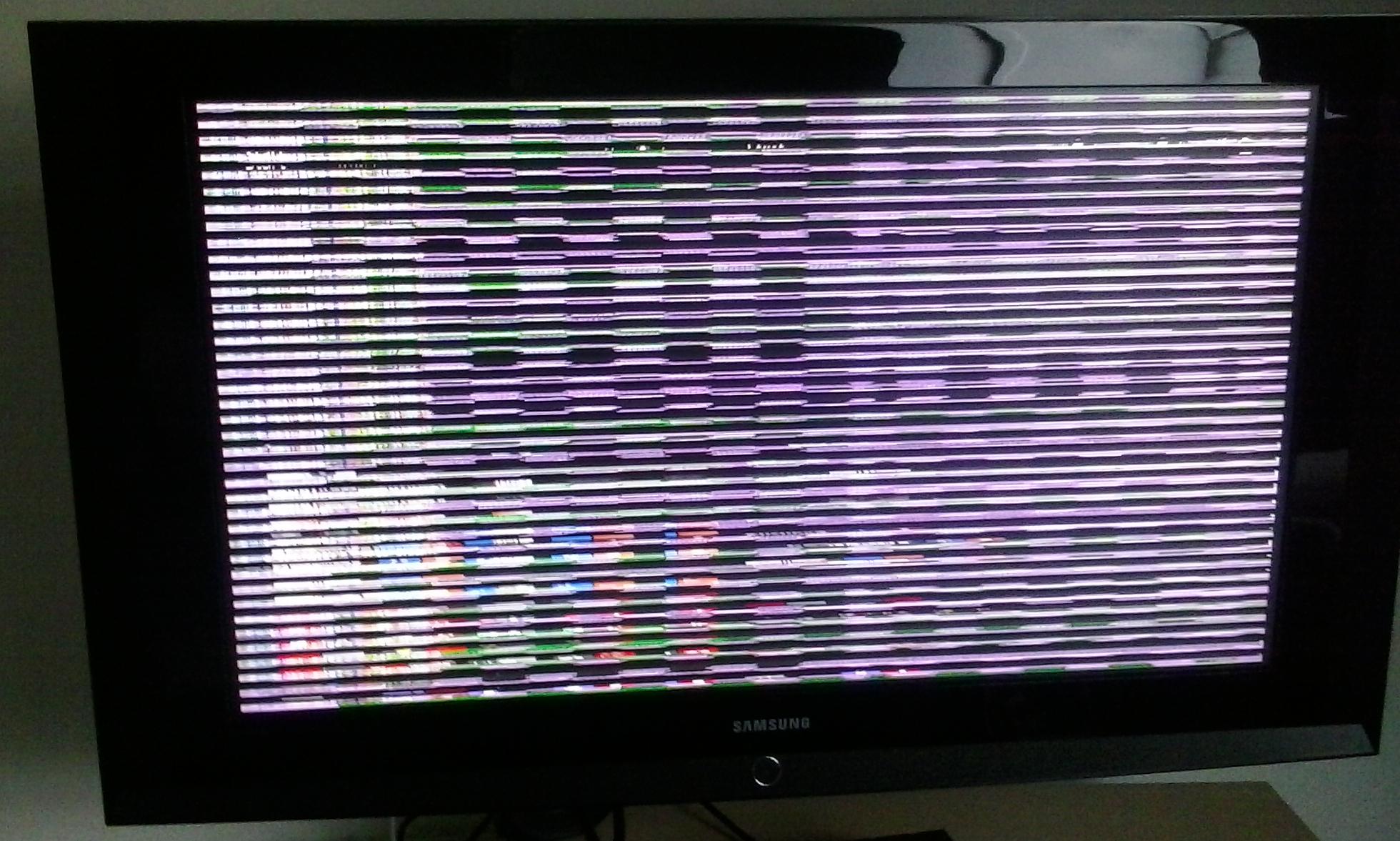
I recently upgraded to PC gaming from a PS3 and decided to go for a Club 3d Radeon R9 290 as a GPU due to the good reviews, I got this card as a present from my aunt. I went PC gaming for about two weeks before my setup started to have problems and now it doesn’t work at all. The BIOS screen during boot is streched out, the bios menu is graphically buggy and while the windows 8.1 logo during boot is ok the screen after it is unusable (see picture down below), I think the Club 3d GPU is the issue in my built, an other GPU works fine. both the power cables from PSU to GPU are connected and I use the HDMI output (tried different cables/displays). I wanted to get support but got advised to post a thread on here. I realy hope you guys can help me.

My build:
CPU : Intel 4770k
CPU Cooling: Liquid
PSU: 1000 Watt
MOBO: ASUS Maximus Formula VI
GPU: Club 3D R9 290

Hope to hear from you soon Club 3D!

Rick
Insert Image Size must be less than < 5MB.
Save Cancel
Reply
0 0 on 22-04-2015
Paul

Hi Rick,
Thank you for posting and we apologize for the inconvenience.
I think there is an issue with the display timings on the HDTV. Can you detail us the Samsung HDTV model you are using?
Have checked if the card has the same issue by using a standard computer display?
If you do have a computer display, I suggest to use it along with the HDTV so you can check on the display settings by using the Catalyst Control Center.
Kind regards

Insert Image Size must be less than < 5MB.
Save Cancel
Show more replies
Reply
Reply Cancel
Login to Reply
Insert Image Size must be less than < 5MB.
Reply Cancel
  • All Posts
  • Following Posts
  • Blog
Copyright 2025 Club 3D B.V.