• All
  • Members Lounge
  • USB Type C
  • Docking Station
  • MST Hub
  • USB Graphics
  • Adapters and Cables
    • DisplayPort 1.4 to 4K120Hz HDMI Adapter
  • Graphics cards
    • R9 Series
      • R9 Fury Series
      • R9 390 Series
      • R9 380 Series
      • R9 290 Series
      • R9 280 Series
      • R9 270 Series
    • R7 Series
      • R7 300 Series
      • R7 260 Series
    • R5 Series
    • Others
    • HD 7000 Series
  • Technology
  • Market Place
    • Hot Deals
    • For Sale or Trade
  • Warranty questions
  • Never Settle Campaign
  • News

Club 3D Insights

  • Unfollow
  • Follow
  • Profile
  • Logout

CAC-1051 screen-flicking and shifting (DP to DVI-DL active adapter)

Updated on 19-12-2024 in Adapters and Cables.
  • Close
  • Delete
12 0 on 15-08-2017
grealish

Hi I have a CAC-1051 for some weeks now. It is connected in this way:

Quardro M4000 DP => CAC-1051 => DVI-DL cable to HP ZR2740w

DP-6 connected primary 2560×1440+0+0 (normal left inverted right x axis y axis) 597mm x 336mm
2560×1440 59.95*+
1280×720 59.86
@59Hz

However after using the adapter for about an hour, the screen begins to flick in and out to black and then shifts to the left or right. where the image is over-scanned. It usally happens every 10 toi 30mins for about 10mins at a time. If I cycle the monitor or the adapter power. The image is restored.
It gets really frustrating after some time, I know the monitor is not at fault because connecting directly with DP it’s fine. However my setup is that I connect my laptop over mini-DP to DP and the DVI-DL port on the monitor is connected to the workstation on the Quadro M4000.

Is anyone else using it in this setup? and seeing the same issues?

The issue is the same in the reviews here
https://www.amazon.com/DisplayPort-Dual-Link-Adapter-Support-CAC-1051/dp/B00SOXO592

Insert Image Size must be less than < 5MB.
Save Cancel
Reply
1 0 on 16-08-2017
MST1407

Good day grealish,
Sorry to hear this. Lets try to fix this by updating the firmware of the adapter, you cna find the files here: 
https://www.dropbox.com/sh/8lp127iup1x48o7/AACPEWL5vW9EXXkFegSaPG1oa?dl=0

Insert Image Size must be less than < 5MB.
Save Cancel
Show more replies
0
rmblas

Dear Sir,

Could you please also upload the 2.19.000 FW version?

Thanks in advance.

Reply
Reply Cancel
1 0 on 19-08-2017
grealish

Thank for the quick reply. I just downloaded the update package, however it requires windows, is there any linux tools available to flash the device with?

Insert Image Size must be less than < 5MB.
Save Cancel
Show more replies
0
MST1407

Hi gealish, very sorry but we have no other updater program available 🙁

Reply
Reply Cancel
1 0 on 17-03-2020
grealish

Firmware Version information

EDID information
Product ID: SYN2300
Serial No: 00000000

CHIP ID: VMM2326
CHIP version: A3
Manufacture date: 18th week of the year 2013

Company ID: 10
Board ID: 01
Firmware name: *irmware_bzddvi
Firmware version: 2.19.000
Configration file version: 004

Bootloader version: 002

Bootstrap setting: 0x00
JTAG loading: Disabled
Firmware storage interface: SPI
SPI mode: 0
Address size: 3bytes
Load speed: 27Mbps
MCU speed: 270MHz

Firmware image load result: 0x0f, error code: 00
Firmware code loading OK
Configuration block0 loading OK
Configuration block1 loading OK
HDCP key check OK

Insert Image Size must be less than < 5MB.
Save Cancel
Show more replies
0
grealish

New Version:


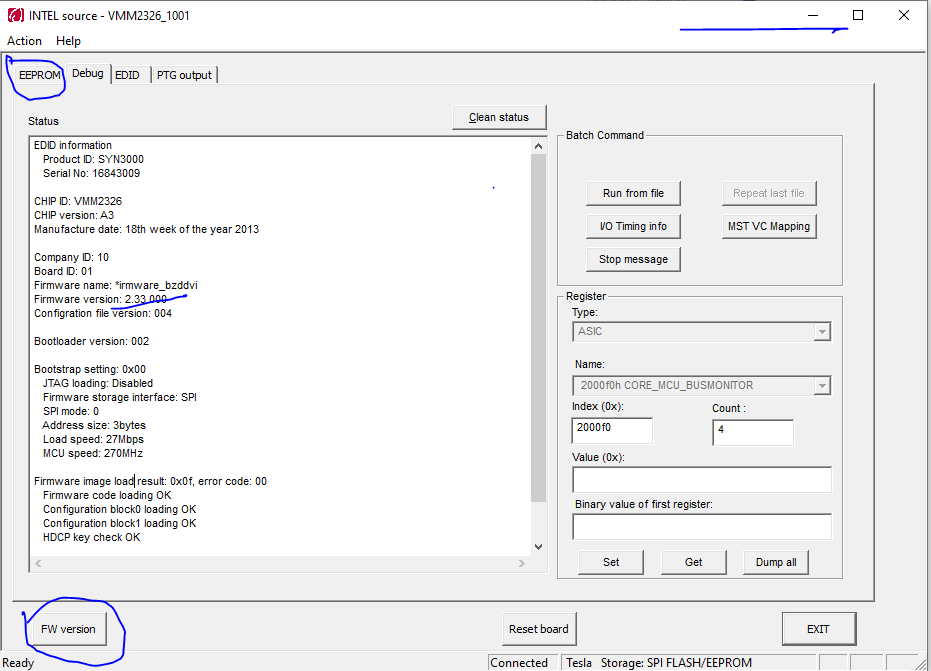
EDID information
Product ID: SYN3000
Serial No: 16843009
CHIP ID: VMM2326
CHIP version: A3
Manufacture date: 18th week of the year 2013
Company ID: 10
Board ID: 01
Firmware name: *irmware_bzddvi
Firmware version: 2.33.000
Configration file version: 004
Bootloader version: 002
Bootstrap setting: 0x00
JTAG loading: Disabled
Firmware storage interface: SPI
SPI mode: 0
Address size: 3bytes
Load speed: 27Mbps
MCU speed: 270MHz
Firmware image load result: 0x0f, error code: 00
Firmware code loading OK
Configuration block0 loading OK
Configuration block1 loading OK
HDCP key check OK


Reply
Reply Cancel
0 0 on 17-03-2020
grealish

This message was meant to be first, after changing monitor, to another HP ZR30w, I noticed the screen again flicks on and off after a few hours, here’s the messages I got on the firmware updates


RX: SST 4lane HBR mode, enhanced frame enabled, Lock sts: 001000f0
Symbol error recently: 8000 8000 8000 8000, in 1s: 8000 8000 8000 8000
RFRM0: [email protected] 8bpc, pixel clock: 268.5MHz, HDCP disabled, Audio disabled, state 1
HT: 2720, VT: 1646, HA: 2560, VA: 1600, HS: 112, VS: 43, HSW: 32, VSW: 6, HPOL: 0, VPOL: 1
TX0: HPD ON, DDVI_O output,output enabled
[email protected] 8bpc, pixel clock: 291.9MHz, HDCP disabled, Audio disabled
HT: 0, VT: 0, HA: 0, VA: 0, HS: 0, VS: 0, HSW: 0, VSW: 0, HPOL: 0, VPOL: 0
RFRM1: [email protected] 8bpc, pixel clock: 268.5MHz, HDCP disabled, Audio disabled, state 6
HT: 2720, VT: 1646, HA: 2560, VA: 1600, HS: 112, VS: 43, HSW: 32, VSW: 6, HPOL: 0, VPOL: 1
TX1: HPD ON, DDVI_E output,output enabled
[email protected] 8bpc, pixel clock: 134.3MHz, HDCP disabled, Audio disabled
HT: 1360, VT: 1646, HA: 1280, VA: 1600, HS: 56, VS: 43, HSW: 16, VSW: 6, HPOL: 0, VPOL: 1
RFRM2: [email protected] 8bpc, pixel clock: 268.5MHz, HDCP disabled, Audio disabled, state 1
HT: 2720, VT: 1646, HA: 2560, VA: 1600, HS: 112, VS: 43, HSW: 32, VSW: 6, HPOL: 0, VPOL: 1
TX2: HPD signal is low


Insert Image Size must be less than < 5MB.
Save Cancel
Show more replies
Reply
Reply Cancel
1 0 on 17-03-2020
grealish

For anyone that lands on this post, it’s not imidiate triviaul to understand how to flash the firmware on the devices, one has to have the following ready: 

  • Adapter plugged into the PC/Laptop, both mDP and DP need to be active, USB is really only used as power, but needs to be on a USB port that could charge your phone, but needs to be on the same computer so the ground (GND) is common
  • Have a monitor plugged in, Wait for the monitor to be detect
  • open the PriusDPTool (run as adminstrator), the tool should say “Connected”
  • Click on the EEPROM Tab, and look for the “Binary file” block, 
  • click on “Load to EEPROM”, locate the .eeprom file that was shared on dropbox or else where
  • The firmware will start to upload to the device, it’s critical that on this stage there is no powerloss, best is if your using a laptop that it’s either full charged or plugged in. 
  • It will request to reboot the device, removing the USB power will reboot the device, cycle the device and the monitor should come up agian
  • return to the INTEL source tool and click “FW version” 
  • look at the output and you should see the firmware version incremented. 


Insert Image Size must be less than < 5MB.
Save Cancel
Show more replies
0
CLUBBIE

Thank you this is very useful

Reply
Reply Cancel
0 0 on 09-12-2024
acoola

Hi, I have monitor without HDCP and I need same firmware with HDCP OFF. Please help!

Insert Image Size must be less than < 5MB.
Save Cancel
Show more replies
Reply
Reply Cancel
0 0 on 10-12-2024
joevt

This forum does not sort posts by last post date. Therefore, for old threads such as this one, you might be better off creating a new thread.

Send an e-mail to support. For contact information, go to https://www.club-3d.com/en/info/6/contact/


Insert Image Size must be less than < 5MB.
Save Cancel
Show more replies
Reply
Reply Cancel
Login to Reply
Insert Image Size must be less than < 5MB.
Reply Cancel
  • All Posts
  • Following Posts
  • Blog
Copyright 2025 Club 3D B.V.