Hi Guonghua,
Sorry to hear this.
In general ...
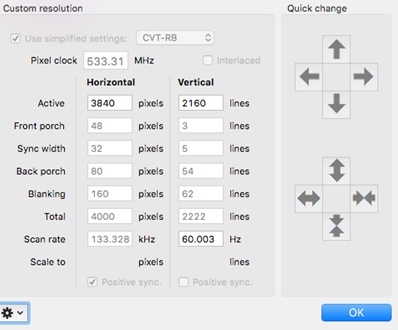
Setups with TV's normally work best by making a custom resolution, in this case for: 3840*2160 at 60 Hz with Timing Standard set to CVT-RB (Reduced Blanking).
(For setups with Monitors Timing Standard can remain on “auto”.)
On most TV’s you will need to do some settings like “Enhanced Mode”/ “PC-Mode” and/or “UHD Color” for the HDMI 2.0 port in use.
Please make sure the HDMI port of the Screen/TV supports 4K 60 Hz, often not all HDMI inputs support that.
Please make sure the HDMI Cable can do 4K at 60 Hz / 18Gbps, like our CAC-1310
To be able to generate such a Custom Resolution you will probably need an app like SwitchResX since MAC OS does not provide such settings.
Should be something like this, please do make sure to have it set to “CVT-RB”
I will ask [email protected] to send you latest available firmware.
