
• All
  • Members Lounge
  • USB Type C
  • Docking Station
  • MST Hub
  • USB Graphics
  • Adapters and Cables
    • DisplayPort 1.4 to 4K120Hz HDMI Adapter
  • Graphics cards
    • R9 Series
      • R9 Fury Series
      • R9 390 Series
      • R9 380 Series
      • R9 290 Series
      • R9 280 Series
      • R9 270 Series
    • R7 Series
      • R7 300 Series
      • R7 260 Series
    • R5 Series
    • Others
    • HD 7000 Series
  • Technology
  • Market Place
    • Hot Deals
    • For Sale or Trade
  • Warranty questions
  • Never Settle Campaign
  • News

Club 3D Insights

  • Unfollow
  • Follow
  • Profile
  • Logout

USB3.2 Gen 1 Type-C to Dual Link DVI-0D HDCP ON active Adapter.

Updated on 03-08-2021 in Adapters and Cables.
  • Close
  • Delete
10 0 on 15-01-2021
Brett
I’ve a USB3.2 Gen 1 Type-C to Dual Link DVI-0D HDCP ON  active Adapter. I’m looking for a HDCP OFF Version but in the meantime Club 3d have sent a firmware update so I can convert the Adapter. 
 
I have tried to install the Firmware following the instructions as given.
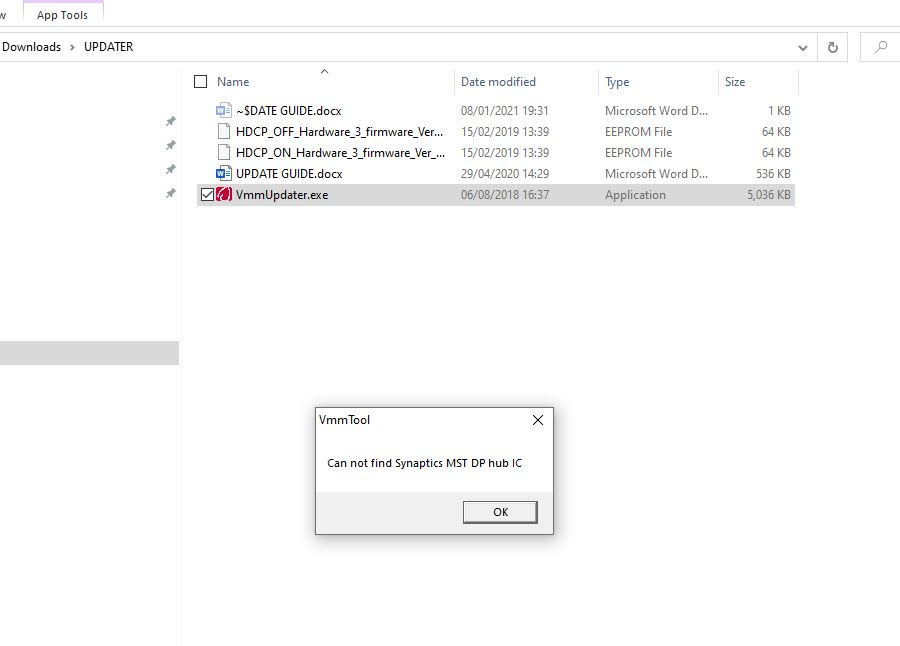
Downloaded the firmware files and ran the application but unfortunately I got this error message:
 
“Can not find the Synaptics MST DP Port hub ” 
 
Can you let me know what I should do?


Insert Image Size must be less than < 5MB.
Save Cancel
Reply
0 0 on 15-01-2021
Baak

Hi Brett,

Have you unzipped the file before trying to use the .exe file? Save it on your desktop and use it as an administrator.

Is the CAC-1510 attached to the computer? You must connect it to the DVI as well.

Hope this helps.


Insert Image Size must be less than < 5MB.
Save Cancel
Show more replies
Reply
Reply Cancel
1 0 on 21-01-2021
joevt

Why would the CAC-1510 have a MST DisplayPort Hub?

Insert Image Size must be less than < 5MB.
Save Cancel
Show more replies
0
joevt

The CAC-1510 does contain a chip from Synaptics according to the DPCD info but I don’t know which chip. The older Startech DisplayPort 1.2 to DVI Dual Link adapter  also uses a Synaptics chip but it may be an older chip or it has an older firmware.

Reply
Reply Cancel
0 0 on 01-08-2021
davehakkens

Does anyone know where i can download this driver? I also have a connector which I need to make mac-ready. As seen in this topic

Insert Image Size must be less than < 5MB.
Save Cancel
Show more replies
Reply
Reply Cancel
0 0 on 02-08-2021
joevt

There is a tool at https://kb.cablematters.com/index.php?View=entry&EntryID=147 (downloaded the 201388FirmwareUpdateTool.zip ) called VmmDPTool.exe that might work. It can extract and update firmware from many Synaptics devices.

The tool says the CAC-1510 contains a VMM-2320. This matches the numbers shown in the AGDCDiagnose output on a Mac […-…-…-…-035-032] = 0x23, 0x20. The firmwares I have for HDCP-ON and HDCP-OFF are version 2.33.102.


Insert Image Size must be less than < 5MB.
Save Cancel
Show more replies
Reply
Reply Cancel
0 0 on 02-08-2021
davehakkens

thanks a lot!

Insert Image Size must be less than < 5MB.
Save Cancel
Show more replies
Reply
Reply Cancel
0 0 on 02-08-2021
joevt

You still need to get the firmware update from club-3d but at least you can check the current version.

Insert Image Size must be less than < 5MB.
Save Cancel
Show more replies
Reply
Reply Cancel
0 0 on 03-08-2021
davehakkens

yep got it from them. works now. easy 🙂

Insert Image Size must be less than < 5MB.
Save Cancel
Show more replies
Reply
Reply Cancel
0 0 on 03-08-2021
joevt

Is your firmware version the same as mine?


Insert Image Size must be less than < 5MB.
Save Cancel
Show more replies
Reply
Reply Cancel
0 0 on 03-08-2021
davehakkens

you can find it here if you want

https://file.io/LGjT4qiSBG6G

Insert Image Size must be less than < 5MB.
Save Cancel
Show more replies
Reply
Reply Cancel
Login to Reply
Insert Image Size must be less than < 5MB.
Reply Cancel
  • All Posts
  • Following Posts
  • Blog
Copyright 2026 Club 3D B.V.