
We've got 120 of these dockingstations. All got the same problem. Completely at random times/days all dockingstations that are in use at that time suddenly crashes.
There are 2 lights on the dock a green and blue one when you dock is on and connected. Suddenly your laptop makes an 'usb disconnection' sound while your working on it. The lights on the dock stay on, but the image on the external monitor(s) freeze. The laptop still works fine when this happens. The only solution we have is to unplug power from dock and plug it back in. Sometimes it happens 3 or 4 times in a row. Strange thing is that when 60 people in the office are working with the docks ALL docks get stuck at almost the same time (in a mather of seconds).
I had a lot of contact with Displaylink support but are saying that it's not a driver issue. We tried version 8.0M1 and the new 8.0M2.
We use HP X360 13 S125ND notebooks (quite a new model)
Windows 10 x64 enterprise 1607 fully updated
All drivers we could think of (graphics, dock, USB, Chipset, wifi, LAN) are on the latest versions.
Also tried new BIOS from HP.
We use a mix of HDMI and DVI connected monitors. Makes no difference.
Could it be something within the docks? I'm breaking my mind with this issue. I do not understand why all docks get stuck at ones.
I hope someone can point me into the right direction. Thanks in advance.
All CSV 3242HD get stuck together
Yes it is. I'll do one.
I also see critical errors in the eventvwr when this happens. The picture is in Dutch, but translated it's:
A problem has occurred with one or more user-mode drivers and the hosting process has been terminated. This may temporarily interrupt your ability to access the devices.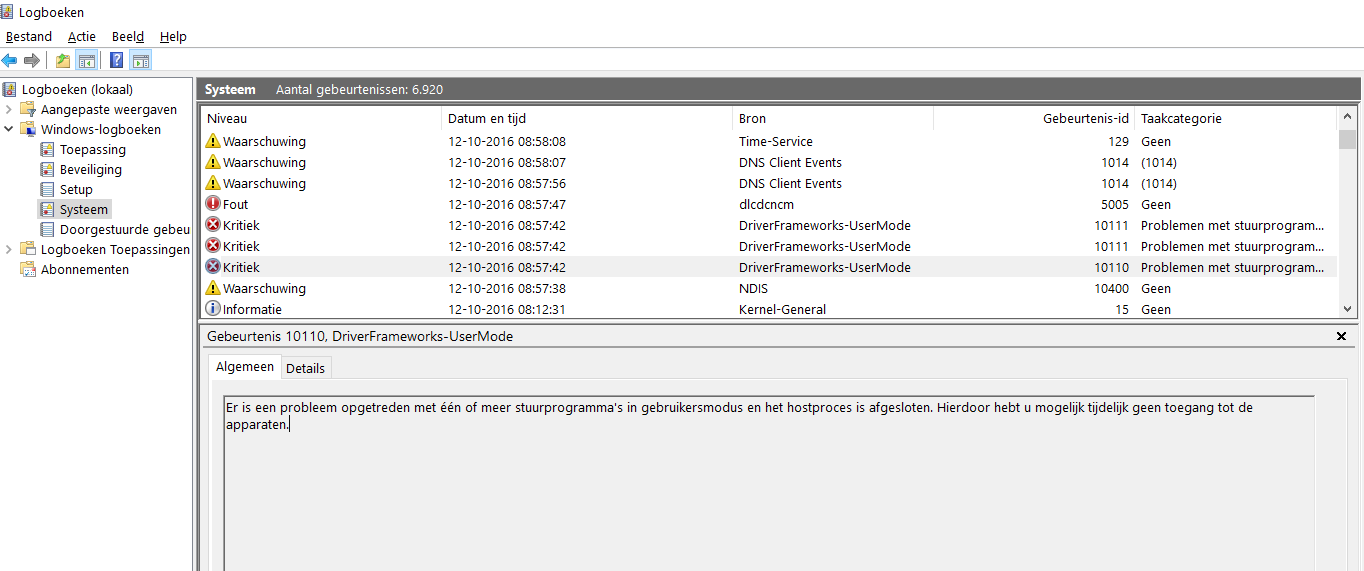
Still sounds like a driver/software issue ...
is there a recent version of Microsoft.Net Frameworks installed on the systems?
Programmers often make software by combining their own source code with that of MS.NET Framework.
https://www.microsoft.com/net/download
Did you have this issue from the beginning or did the problem start after some time ?
Reently update windows or anything like that ?