• All
  • Members Lounge
  • USB Type C
  • Docking Station
  • MST Hub
  • USB Graphics
  • Adapters and Cables
    • DisplayPort 1.4 to 4K120Hz HDMI Adapter
  • Graphics cards
    • R9 Series
      • R9 Fury Series
      • R9 390 Series
      • R9 380 Series
      • R9 290 Series
      • R9 280 Series
      • R9 270 Series
    • R7 Series
      • R7 300 Series
      • R7 260 Series
    • R5 Series
    • Others
    • HD 7000 Series
  • Technology
  • Market Place
    • Hot Deals
    • For Sale or Trade
  • Warranty questions
  • Never Settle Campaign
  • News

Club 3D Insights

  • Unfollow
  • Follow
  • Profile
  • Logout

CAC-1335 supports 1440p@240Hz?

Updated on 11-09-2024 in Adapters and Cables.
  • Close
  • Delete
6 0 on 09-02-2024
raigeki21

I will tell you my setup from the graphic card to the monitor:

I’ve a 6800xt which has HDMI 2.1 output.

a 1 cable hdmi 2.1 @  48 Gbit/s (link :https://www.digitec.ch/fr/s1/product/club-3d-hdmi-typ-a-hdmi-typ-a-3-m-hdmi-cable-video-11469803?supplier=406802)

And then Avermedia Live Gamer ULTRA 2.1 (GC553G2) (link:https://www.digitec.ch/fr/s1/product/avermedia-boitier-de-capture-video-live-gamer-ultra-21-gc553g2-enregistreur-de-jeu-40112182?supplier=406802)

with a CAC-1335 adaptator in the output. (link: https://www.digitec.ch/fr/s1/product/club-3d-club3d-adaptateur-hdmi-microusb-dp-120hz-actif-stbu-dp-100-cm-adaptateur-donnees-video-21876556?supplier=406802)

after I ahve a DIsplay port 1.4 cable

and a screen  Samsung Odysee G7 (link: https://www.digitec.ch/fr/s1/product/samsung-odyssey-g7-lc27g75tqsrxen-2560-x-1440-pixels-27-moniteur-12524443)

(my screen had only 2.0 HDMi and 1.4 Displayport)


I can have 4K 120Hz as output on my Avermedia Live Gamer ULTRA 2.1 (GC553G2) but no 14440p (2K) 240 hz do you know why?


There is some firewire?


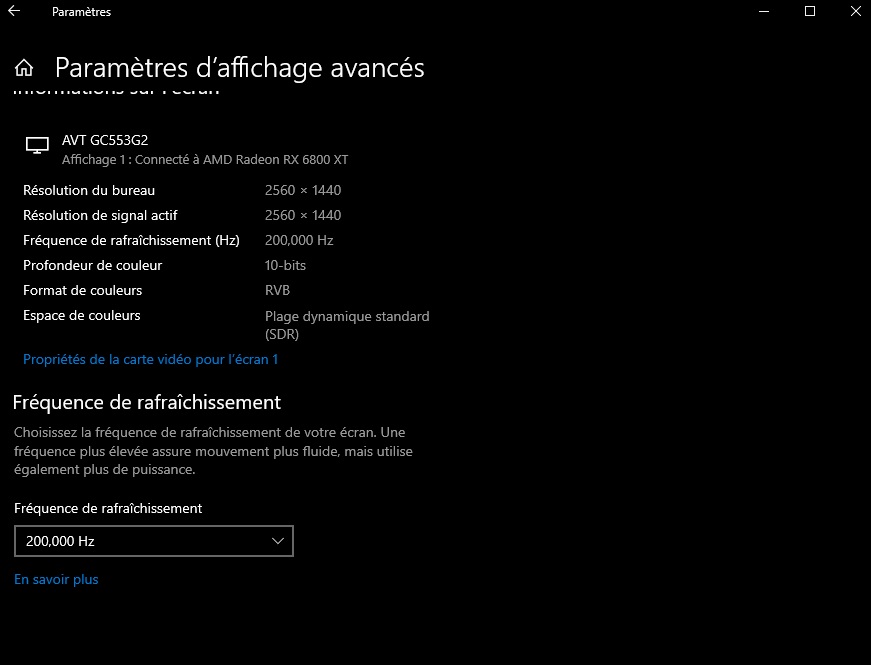
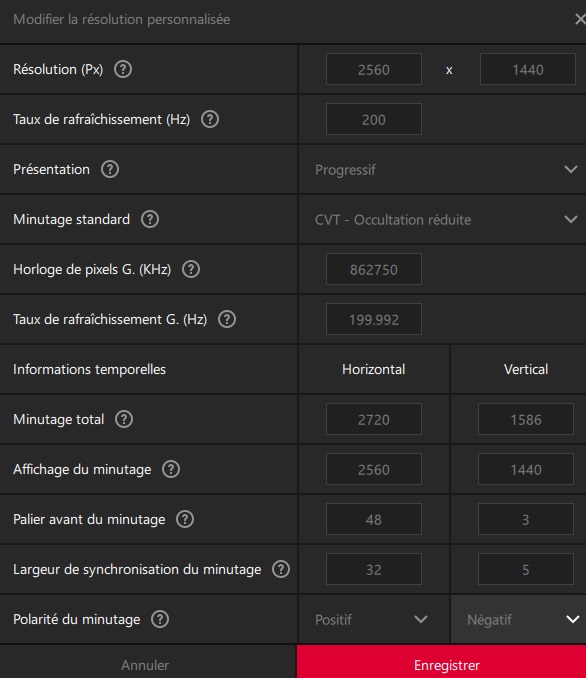
i could creat a custom resolutuion at 200hz with amd adrenaline


Insert Image Size must be less than < 5MB.
Save Cancel
Reply
0 0 on 09-02-2024
Baak

Can you get 2K240Hz without the Avermedia capture card?

So, 6800 XT -> CAC-1335 -> DP 1.4 Cable -> Display

Insert Image Size must be less than < 5MB.
Save Cancel
Show more replies
Reply
Reply Cancel
1 0 on 14-02-2024
raigeki21

wow, on direct it’s 240 hz. 

So, 6800 XT -> CAC-1335 -> DP 1.4 Cable -> Display

thx


Insert Image Size must be less than < 5MB.
Save Cancel
Show more replies
0
Baak

That’s great! I think it has something to do with Capture card not supporting DSC. Not sure tho, but great that the CAC-1335 supports 1440p@240Hz directly 🙂

Reply
Reply Cancel
1 0 on 09-03-2024
alegri

Can the CAC-1335 output 1440 @ 170Hz with HDR?! I have an ACER Nitro Xv272U. The HDMI port from the GPU gives me 120Hz max. with HDR.

Insert Image Size must be less than < 5MB.
Save Cancel
Show more replies
0
Baak

Depends on your source. I think your source is HDMI 2.0 and not HDMI 2.1.

It should support 1440 @ 170Hz using a HDMI2.1 source and a DP1.4 cable.

Reply
Reply Cancel
0 0 on 11-09-2024
Torney

The Avermedia likely prioritizes 4K over higher refresh rates. For 1440p 240Hz, try connecting the GPU directly to your monitor using DisplayPort. Firewire isn’t relevant here.

Insert Image Size must be less than < 5MB.
Save Cancel
Show more replies
Reply
Reply Cancel
Login to Reply
Insert Image Size must be less than < 5MB.
Reply Cancel
  • All Posts
  • Following Posts
  • Blog
Copyright 2026 Club 3D B.V.