
Club 3D CSV-1564 loses network with MS Teams meetings. Hello, we have multiple Club 3D CSV-1564 type dock stations in our environment. We have found intermittent issues with Microsoft Teams meetings. In the middle of a meeting, the dock station will lose its network entirely, all network traffic is lost, not just Teams related traffic. This is on multiple PCs and multiple dock stations of this type we have had this issue. A PC reboot restores network connectivity, but this can happen again the next time another meeting is started. I tried updating the ASIX NIC driver that ships with the dock station, but it did not appear to fix the issue completely even after updating to newer driver. Is there any sort of firmware update that might help? We've ordered dozens of these in our environment and these disconnection issues are frustrating our users. If there's any idea on how we can maybe do firmware update or something of that nature, let me know. Thank you!!
Club 3D CSV-1564 loses network connectivity with MS Teams meetings
Sounds like the USB you connect the dockingstation to is shutting down it's power. Could you play around with those settings?
I suggest to go to Device Manager and under USB – you could try disabling the USB Power Management Setting
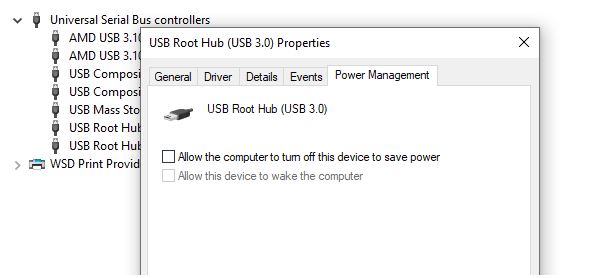
Also I suggest to Uninstall/ or disable USB Devices that are not longer used.
Note that USB devices will always be installed when needed but they need to be manually uninstalled or disable to avoid conflicts.