• All
  • Members Lounge
  • USB Type C
  • Docking Station
  • MST Hub
  • USB Graphics
  • Adapters and Cables
    • DisplayPort 1.4 to 4K120Hz HDMI Adapter
  • Graphics cards
    • R9 Series
      • R9 Fury Series
      • R9 390 Series
      • R9 380 Series
      • R9 290 Series
      • R9 280 Series
      • R9 270 Series
    • R7 Series
      • R7 300 Series
      • R7 260 Series
    • R5 Series
    • Others
    • HD 7000 Series
  • Technology
  • Market Place
    • Hot Deals
    • For Sale or Trade
  • Warranty questions
  • Never Settle Campaign
  • News

Club 3D Insights

  • Unfollow
  • Follow
  • Profile
  • Logout

Royalking r9 280 fan sound too high and 65 degrees after playing Skyrim for 5 mins!

Updated on 26-05-2015 in R9 280 Series.
  • Close
  • Delete
10 0 on 24-05-2015
Saif Alawqati

Hello all,

The fanspeed gets very high lately and the noise of it also, it sounds like my computer will fly away, this all happens for example when playing skyrim for 5 mins. GPU gets also like 65 degrees. Is this normal??
And what are the standard settings of the core, mhz, and fan speed settings for catalyst AMD?

Please help!!

Insert Image Size must be less than < 5MB.
Save Cancel
Reply
0 0 on 24-05-2015
Paul

Can you detail us what model you have?
Thanks

Insert Image Size must be less than < 5MB.
Save Cancel
Show more replies
Reply
Reply Cancel
1 0 on 24-05-2015
Saif Alawqati

Hello sir,

The AMD Radeon R9 280 Royalking of Club 3d
CGAX-R9287O – PCI Express 3.0 – 3072MB – GDDR5 – 384 BIT

Insert Image Size must be less than < 5MB.
Save Cancel
Show more replies
0
Paul

Hi Saif,
Please make sure that your mainboard BIOS is up to date. Also please check if your windows is also up to date. Under the task bar input under search “windows update”, once completed the updates please click under the same window Search windows update online, normally users do not do this and you will be prompted for more updates.
Update the latest Catalyst OMEGA driver for the video card.
Check if your system has proper cooling, if temperatures run to high consider adding case cooling fans. 65C on the GPU is considered normal for this card.
Does it occur with other games? Check if you have applied the latest patch on the Skyrim game.
Check if you can add under Catalyst your game profile, adjust settings accordingly.
Is your V-Sync on on the game?

Reply
Reply Cancel
0 0 on 25-05-2015
Saif Alawqati

I think i have managed the problem, it was the BIOS version and Windows update. Till now its working fine. Thank you for your help and time sir.

Your Sincerely,
Saif

Insert Image Size must be less than < 5MB.
Save Cancel
Show more replies
Reply
Reply Cancel
1 0 on 25-05-2015
Saif Alawqati

well its still getting higher (the temprature) but not high as then, but the fan sound gets higher, not like ticking but normal fan sound. the fan speed stays 25% in the settings of catalyst and gpu-z is this normal? also when the fan is rotating faster and faster?

thank you,

Insert Image Size must be less than < 5MB.
Save Cancel
Show more replies
0
Paul

Hi,
The automatic settings will rise the fan speed as the card temperature goes high. You can limit this settings by going into Catalyst / Performance AMD Overdrive and manually change those settings.
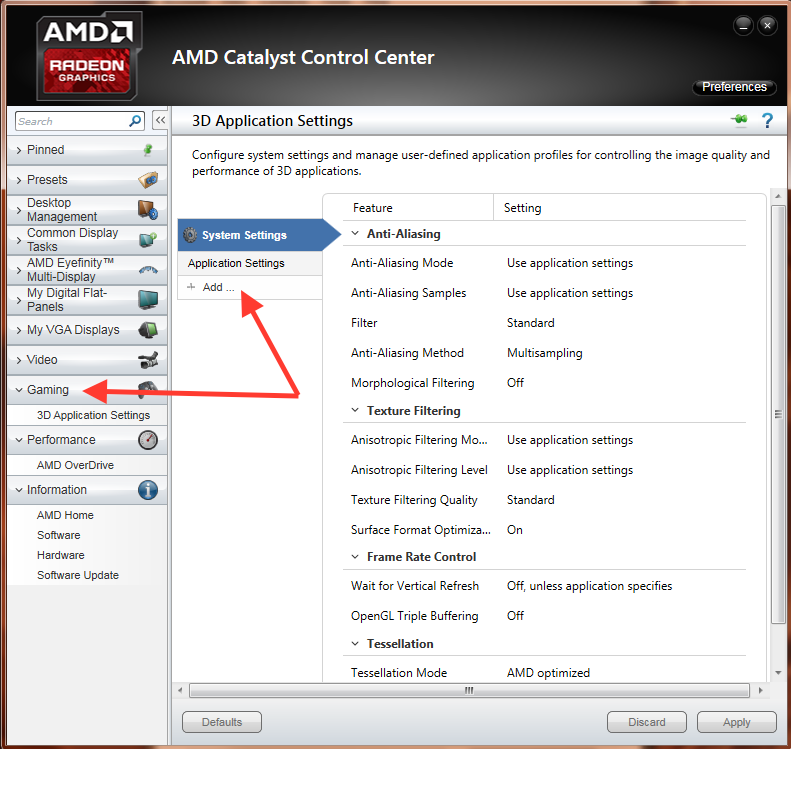
You can add under Catalyst/Gaming/3D application settings the game and optmize it so the card will not get that hot.

Reply
Reply Cancel
1 0 on 26-05-2015
Saif Alawqati

Thank you,

The gpu clock is set on 300 mhz in catalyst and the mem clock is 150 in idle. So when i play a game it gets higher right?

And in catalyst 14.12 there is no game settings.

Insert Image Size must be less than < 5MB.
Save Cancel
Show more replies
0
Paul

Hi,
Powertune regulates the power use when the card is not using a 3D application, therefore when not in use, the system will lower the speeds to preserve power. When it detects a 3D application then the speed will change accordingly.
The Catalyst 14.12 has a 3D Application settings where you can add the game profiles.
Find attached the picture

Reply
Reply Cancel
0 0 on 26-05-2015
Saif Alawqati

O yes i see it now , thank you 🙂

Insert Image Size must be less than < 5MB.
Save Cancel
Show more replies
Reply
Reply Cancel
0 0 on 26-05-2015
Saif Alawqati

I think i know what the problem was.

When i set it on auto speed in catalyst. The fan stays at 25 percent even when iam playing skyrim or other games for half an hour.

Thats why the heat of the GPU goes up and the PSU and or cpu fan gets louder. I wasnt the GPU fan that got lowder.

Now i set the fan speed of the gpu manually to 55 percent when playing games. The computer doenst want to fly again till now hhaha. So the fan of the gpu doesnt adapt to the heat if on auto.
I have to change it manually.

Insert Image Size must be less than < 5MB.
Save Cancel
Show more replies
Reply
Reply Cancel
Login to Reply
Insert Image Size must be less than < 5MB.
Reply Cancel
  • All Posts
  • Following Posts
  • Blog
Copyright 2025 Club 3D B.V.