• All
  • Members Lounge
  • USB Type C
  • Docking Station
  • MST Hub
  • USB Graphics
  • Adapters and Cables
    • DisplayPort 1.4 to 4K120Hz HDMI Adapter
  • Graphics cards
    • R9 Series
      • R9 Fury Series
      • R9 390 Series
      • R9 380 Series
      • R9 290 Series
      • R9 280 Series
      • R9 270 Series
    • R7 Series
      • R7 300 Series
      • R7 260 Series
    • R5 Series
    • Others
    • HD 7000 Series
  • Technology
  • Market Place
    • Hot Deals
    • For Sale or Trade
  • Warranty questions
  • Never Settle Campaign
  • News

Club 3D Insights

  • Unfollow
  • Follow
  • Profile
  • Logout

Can CAC-1070 adapter run 4K@60HZ with RGB (color format) output?

Updated on 15-08-2018 in Adapters and Cables.
  • Close
  • Delete
7 0 on 14-08-2018
function

Hi everyone,
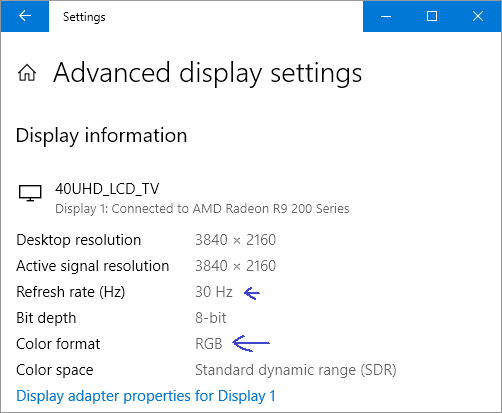
I’m using Club3D CAC-1070 adapter, can it run 4K@60HZ with RGB (color format) output?
I could’t find place to change the setting on Windows 10.
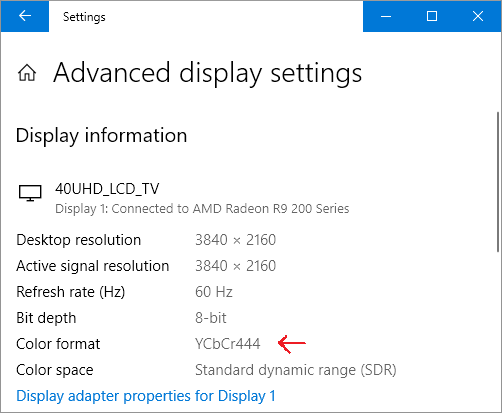
If I change refresh rate to 30Hz then color format change to RGB automatically, but it set YCbCr444 on 60Hz.

I need to work 4K@60HZ RGB color format, how to?

Thanks.


Insert Image Size must be less than < 5MB.
Save Cancel
Reply
0 0 on 14-08-2018
MST1407

Good day Finction,
Yes the adapter also supports Chroma Settings, but the setting for that will need to be done in the Graphics Driver.
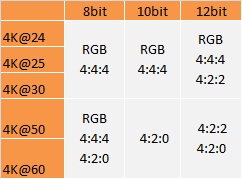
Here’s waht the adapter can do:

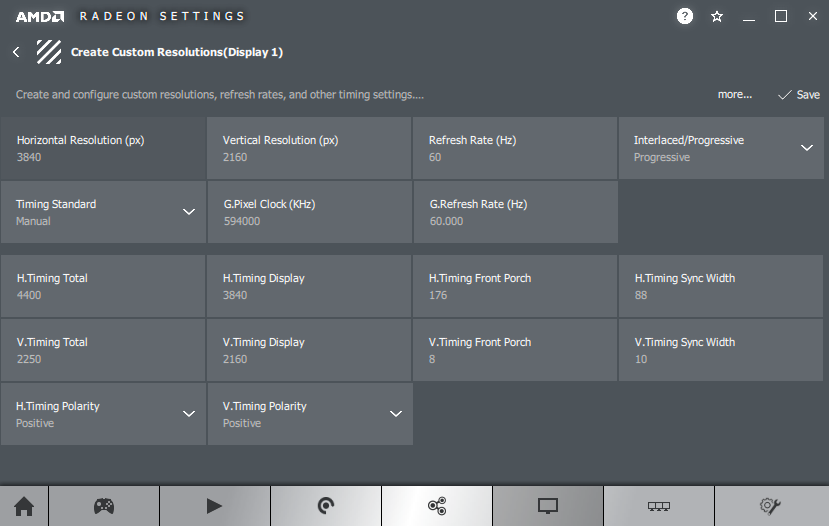
Often that works best by making a custom resolution, which will “over-write” the automatic system settings …

Insert Image Size must be less than < 5MB.
Save Cancel
Show more replies
Reply
Reply Cancel
1 0 on 14-08-2018
function

Hi MST1407, thanks for your reply.
Amd radeon driver tool didn’t do that.

Do you know any tool to over-write it, I couldnt find yet?

Insert Image Size must be less than < 5MB.
Save Cancel
Show more replies
0
MST1407

did you try making a custom resolution in the AMD Driver?
And which version driver are you using ?

Reply
Reply Cancel
0 0 on 14-08-2018
function

Radeon software ver. 18.8.1
There is no “color format” etc. in custom res. panel.

Insert Image Size must be less than < 5MB.
Save Cancel
Show more replies
Reply
Reply Cancel
0 0 on 15-08-2018
MST1407

Hi Function,

Just checked on test system with a 280X and 18.8.1 driver and indeed the driver did not show chroma settings. We will require to do some more testing to find out where that comes from …
We jsut have ahd another IWN Update, perhaps that this had influence …
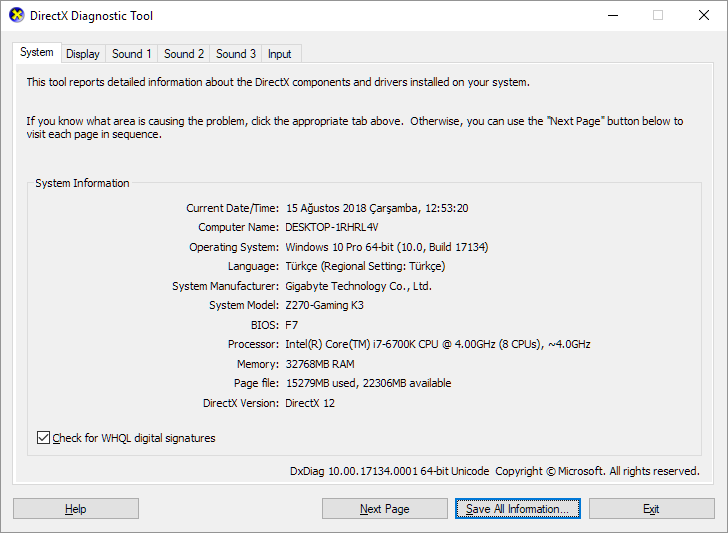
Could you please send your DXDIAG to [email protected]?

(just type “DXDIAG” in the search function of windows and the Direct X Diagnostics will open and run, please safe the info and send it over)

Insert Image Size must be less than < 5MB.
Save Cancel
Show more replies
Reply
Reply Cancel
1 0 on 15-08-2018
function

Hi Mst1407,
I will send it now.
Thanks.

Insert Image Size must be less than < 5MB.
Save Cancel
Show more replies
0
MST1407

yes got your email and answered.

Reply
Reply Cancel
Login to Reply
Insert Image Size must be less than < 5MB.
Reply Cancel
  • All Posts
  • Following Posts
  • Blog
Copyright 2025 Club 3D B.V.