

Baak

Forum Replies Created
-
AuthorPosts
-
Baak
KeymasterAre you plugging the cable into the GPU or Motherboard? 4K30Hz hints to DisplayPort 1.2. Used quite a lot on motherboards.
25-03-2025 at 14:38 in reply to: CSV-1568 problems with Probook 460 and thinkbook 16 (Both Core5 Ultra) #108018KeymasterIs there any other power source connected to the notebook?
25-03-2025 at 14:02 in reply to: CSV-1568 problems with Probook 460 and thinkbook 16 (Both Core5 Ultra) #108013KeymasterOk that’s clear, I don’t know what has been discussed with Wiktor, I’m just a passerby 🙂
When the power is connected, is there anything connected to the lower USB-C too (Pic A)? If yes, disconnect that. Is the host connected as Pic B?
Pic A:
[img width='' height='']https://insights.club-3d.com/wp-content/uploads/2025/03/Screenshot-2025-03-25-140119.png[/img]
Pic B:
[img width='' height='']https://insights.club-3d.com/wp-content/uploads/2025/03/Screenshot-2025-03-25-140328.png[/img]
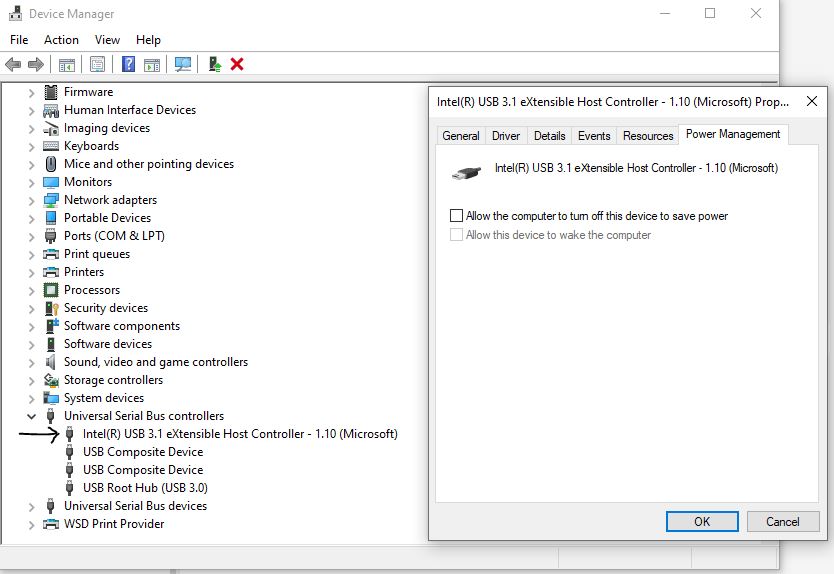
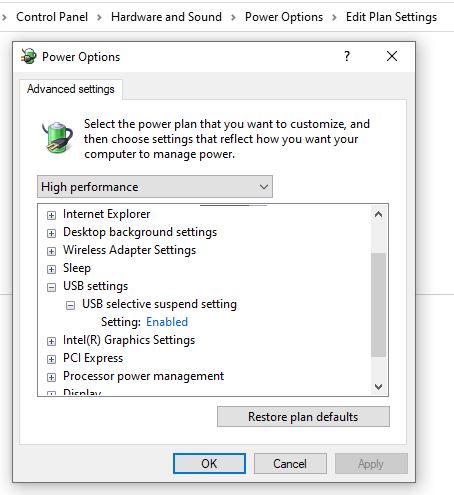
25-03-2025 at 13:27 in reply to: CSV-1568 problems with Probook 460 and thinkbook 16 (Both Core5 Ultra) #108007KeymasterSometimes there are powersaving settings enabled on USB ports from the source (laptops). Could you check and disable those?
 Keymaster
Which dock, laptop, display? Does the dock do anything? USB peripherals work? Network works?
KeymasterMy assumption is that de monitor does something “weird” when connecting both USB-Cs. Can’t put my finger on it tho.
Highly doubt the cable is at fault.KeymasterHave you tried the joy stick on the back of the display to adjust input?
From the Manual, have you followed these steps?
Power Delivery – Further Information
Due to the VX1655-4K-OLED’s design please note:
•
The first connected device will be the main input signal.
•
When a Type C port recognizes an external device as a power adapter, it will only distribute the power. It will NOT display the input signal.
•
Only when one of the Type C ports is recognized as a power adapter can the other one deliver two-way power.
If a laptop is connected first to the VX1655-4K-OLED, then a mobile phone is connected second, the mobile phone’s battery will not be charged as neither Type C port recognizes the connection as being connected to a power adapter.
NOTE: If you want to display the mobile phone’s screen, you must unplug the Type C cable connected to the laptop.
If a mobile phone is connected first to the VX1655-4K-OLED, then a laptop is connected second, the mobile phone’s battery will be charged as one of the Type C ports is recognized as being connected to a power adapter.
NOTE: If you want to display the laptop screen, you must unplug the Type C cable connected to the mobile phone.
Due to the VX1655-4K-OLED’s design, do not connect two laptops or one laptop and a desktop computer at the same time. This can cause power distribution conflicts, resulting in flashing screens or the forced shutdown of the laptop(s).
NOTE:
•
If the laptop has a Type C port, please connect via Type C to the VX1655-4K-OLED.
•
Do not connect the other Type C port of the VX1655-4K-OLED to another laptop or desktop computer via Type A and HDMI at the same time.
•
If the laptop only has HDMI and Type A ports, please connect via HDMI and Type A to Type C to the VX1655-4K-OLED.
•
If the power output of the Type A port of the laptop is not greater than 20W, please use our power adapter to connect to the VX1655-4K-OLED.
•
Do not connect the other Type C port of the VX1655-4K-OLED to another laptop or desktop computer at the same time.KeymasterIs it this one?
https://www.viewsonic.com/global/products/lcd/VX1655-4K-OLED#specs
Does it work with the mini HDMI to HDMI cable?Does the PC recognize any additional displays?
KeymasterDP to USB-C does not provide power.
Did you connect any kind of power source to the portable monitor?
KeymasterSometimes there are powersaving settings enabled on USB ports from the source (laptops). Could you check and disable those?
[img width='' height='']https://insights.club-3d.com/wp-content/uploads/2025/01/PowerSave.jpg[/img]
[img width='' height='']https://insights.club-3d.com/wp-content/uploads/2025/01/powersettings.jpg[/img]
KeymasterWhat happens if you use an HDMI 2.1 cable between NUC and TV?
Assuming you mean LG CX? This LG has 1 eARC HDMI input, is the CAC-1587 connected in this input?
KeymasterIs the support not referring to your iGPU from the UHD630? That apparently only supports DP 1.2?
KeymasterDoes the Laptop also crash without the CSV-1564?
KeymasterAre there any power saving settings on the USB ports?
Is the BIOS up to date?KeymasterI think the chromecast can not output 4K.
https://support.google.com/chromecast/answer/12578818?hl=en -
AuthorPosts
- 3342 Members
- 1417 Threads
- 7414 Replies