
CAC-1070 and 1170 HDMI 2.0 adapter feedback topic.

377 replies #000}.mce-content-body#555;background:#FFF;width:

I’ve made all that SwitchRes standard procedure and the CAC-1170 worked fine at 4K 60Hz with my LG 49UH6500 and my Macbook Pro Retina 15 mid-2015. And then… I played a little with the “scaled” feature in Mac OS Sierra display settings and after two or three scale changes it stopped working. Now all I get is a black screen. Tried deleting the custom resolution I had set up in SwitchRes, then rebooting and then setting it all up again, but still nothing.

Any clues?

I also noted that when I type 60 Hz in SwitchResx it automatically changes the value to 60,004Hz. Could this be the cause of the problem?
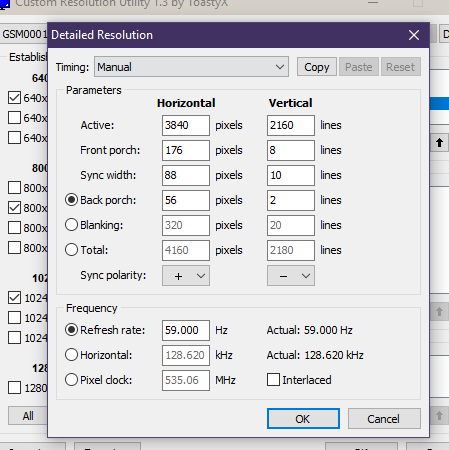
I would say undo that scaling thing you did ... and i will ask [email protected] to send you latest firmware for the adapter ...

I had a lot of flickering on my TV too. I have a amd 290, i made the custom resolution  and put Timing Standard set to CVT-Reduced Blanking. Can i get a firmware update ? 
My TV is a hisense m7000

Hi DenisDA,
Latest firmware you already have received 11-03-2017 by email from Club3D support. That is the 0x46.

Id also like the newest version as im sure others will to why not make a support page for the cable so people can just look what the latest firmware is and download it?.
feels like begging for updates thank god nvidia and others do it this way also i wouldnt mind a changelog see whats new or fixed as i bought this cable for specific reasons as promised on the page you have and none of those features work so that would be great to see if there is progress or im kicking a dead horse here.

Hello HellsAngel,
No need for begging, just drop an email to [email protected] and you will get it.
The reason why we do not post the Firmware online is that more often than not, the firmware is not the solution to issue people are having.
I aksed support to send to you, you should receive that today.

But you can downgrade if it doesnt work, keep older versions on the support page granted you make one and a nice changelog that all seems soo much better then constantly have to guess when there is a new firmware and if we please please can get it.I did receive it but how does it go next time i have to again ask for it? this seems easier for both user and support to just put it on a page just have to upload it once instead of god knows how many times. Everything you update firmware with has a risk but you could add a disclaimer hopefully you do something with this feedback it shouldnt be this difficult to get and see when or if there is a new firmware.

Sierra 10.12.4 update does not support 4k at 60hz.
I'm waiting for any turnaround.. thanks.

I was successfully using a CAC-1173 cable with a Samsung UHD TV until the last MacOS Sierra up-date. Very very very, annoying... thanks Apple.

Di you try making a custom resolution for 3840x2160 at 60Hz with timing standard set to CVT-Reduced Blanking ? You can do that with a program like SwitchResX ...

Thanks for the answer.. yes last night I tried to do so and it works!
Before the update this setting was not required but well.. ok.

I've had some problems to make the custom resolution to install properly also with SIP disabled.. the only way to solve the issue was to create a new user account on my MBP and make all the SwitchResX setting from there.. strange behavior but well... ok.   : )

Good to hear you got it working :-) and thanks for the feedback

Hi, I'm facing problem with cac-1070 after Windows 10 Creators Update. I cannot output 4K 60Hz to my TV. Before update everything worked flawlessly. Is there any chance to get firmware update?

i will have support email you the latest firmware, however i am not so sure it will help you. 
What Graphics Card is inside or what CPU (in case it is integrated graphics) ?

Hi,
Thank you! I will check as soon as possible.
It's Nvidia GTX980M. I forgot to mention that 1080p resolution works for me, but when I switch to something higher display turns off for couple of seconds and then sets 1080p again. I could set 2160p 59hz in nvidia control panel but it worked only once.

Hi,
I checked a new firmawre that you emailed me. Resolution works fine, DP outputs 2160p 60Hz but sound is weird. It's crackling. Is there a reason why it behaviours like that?

The UHD Sound driver is included in the Graphics Driver Pack.

Especially when using the upgrade feature to update drivers can give issues, because old files can remain in the registry of the OS and can be “in the way”. Please make a new clean driver installation to make sure that part is ok.
Please uninstall the current Graphics driver and all related Graphics software like Afterburner/GPU-Z or whatever graphics related software you might have installed. Best way to remove Driver Software is to boot Windows in Safe mode, so the registry can also be cleaned. When you system does not allow you to do that, you can also use a program like DDU to remove such software:
 http://www.wagnardmobile.com/DDU/  

Download and install latest available driver for your device.
You might need to reboot ones or twice during this process.

Hmm, I did everything that I could but it hasn't provided any positive results :( is there no other feedback recently?

Sorry L24 not really no.
Did you try already loading a restore form before that lupdate that messed up your settings ?

Hi L24,

Good to hear and thanks a lot for the feedback.

I have problems with this adapter too. My setup:
-HP GT 730 with DisplayPort (N3R90AA), Kepler
-Delock DP 1.2 male to mini DP female (65237)
-CAC-1170
-Philips 65PUT6121/12, HDMI 3 with UHD 4:4:4 enabled

If I try to output 3840x2160@60 there is a picture, but it does not look like UHD and all the colors are wrong (black is blue and white is yellow if I remember correctly). TV says the signal is 1920x2160, maybe @30 if I again remember correctly. 3840x2160@30 works fine.

I already ordered a CAC-1070 to get rid of that DP to mini DP adapter, but I'm afraid that will not help. I also have a Quadro P400 (Pascal that has mini DP) but the Linux driver is still broken.

Could a firmware update help or what can I try?

Hi Seppok,
I am quite sure your problem is the fact that the Kepler based GPU's (or older) are not really compatible with the Active Adapters converting DP 1.2 to HDMI 2.0.

That's what I thought. I checked and the TV says 1920x2160@60hz. I requested the newest firmware for the adapters because I have nothing to loose. This is annoying because it almost works and I think I read somewhere that somebody had success with a GTX 780 or some other Kepler based card.

The HP GT 730 spec sheet says it outputs 3840x2160 60hz, CVT-RBv1/v2 (8.29M9R), SMPTE 274M from the DisplayPort. It is hard to understand how this signal differs from a signal output by a Maxwell card...

Unfortunately Nvidia has not explained that to me either :-S
Anyway since the EDID info does nto come thrue correctly (1920x2160@60Hz is not correct), i advise you to make a custom resolution for 3480x1260 @ 60 Hz with Timing Standard set to CVT-Reduced Blanking.

Hi All,
I urgently need a solution:  Source HDMI 2.0 4K 60 Hz -to  Display: Display Port 1.2 4K 60 Hz

I find all kinds in the opposite direction.  I can't change the source, it's not a PC.

Hi TTY,

I removed the extra postings that did come trhu somehow !?


To my knowledge there is no HDMI2.0 to DP1.2adapter available in the market currently.

Our R&D has had a project open to devellop this product for about 1 year now, but we have not seen a product from this even on the reaodmap for the mext 6 months (yet).

So the best we can do to convert HDMi to Displayport at this point is:

CAC-1330 = HDMI1.4 to DP1.1

http://www.club-3d.com/index.php/products/reader.en/product/hdmi-14-to-displayport-11-adapter-.html

I'm testing this CAC-1070 rev:A4-00 with 4k 60Hz RGB 444 mode (~600Mpix/s)

With my Samsung UE43KU6075U on input HDMI1 (supporting HDMI2.0) connected directly from my Nvidia GTX1060 graphic board (driver ver 382.53) HDMI2.0 output, this works perfectly.

However, when I use one of the DP outputs on the nvidia, through the CAC-1070, into the same hdmi port, I have problems getting RGB444 through it. The Nvidia control panel claims it is sending RGB, but what I see is the effect of YUV. The tool I use for testing is http://dtest.cyviz.com choose checker pattern, step=1, cycle to color green. Typical symptom is that the 1:1 green checker pattern becomes dull in YUV mode. I am not sure if its UYV444, 422 or 420 but from the small text looks pretty awful with shadows.

Is this a known issue with CAC or Nvidia driver?
If its the CAC, can it be fixed with firmware upgrades?
Regards,

Hello ost,
I will ask [email protected] send you an email with latest available firmware.
Combination with GTX 1060 should work. 

In general:

-          Setup

Setups with TV's normally work best by making a custom resolution, in this case for: 3840*2160 at 60 Hz with Timing Standard set to CVT-RB (Reduced Blanking).

(For setups with Monitors Timing Standard can remain on “auto”.)

On most TV’s you will need to do some settings like “Enhanced Mode”/ “PC-Mode” and/or “UHD Color” for the HDMI 2.0 port in use. 

Please make sure the HDMI port of the Screen/TV supports 4K 60 Hz, often not all HDMI inputs support that.

Please make sure the Software of the TV is updated.

Thanks MST1407.

First an issue with the updater. It could not find the adapter as long as I had a main DP monitor plugged in (my main screen). I had to unplug all except the CAC to get contact at all. Maybe this is worth putting down in the instructions.

2nd, I'm afraid that this firmware didn't fix the problem. I also tried removing all other monitors
See
https://www.flickr.com/photos/7696338@N07/35603620931/in/dateposted-public/lightbox/

vs

https://www.flickr.com/photos/7696338@N07/35603621621/in/dateposted-public/lightbox/

Hi ost,
It is indeed true that it normally works best when the screen connected via the adapter is set as secondary screen.
Active adapters are sensitive to other (espcially) active devices such as MST HUbs active Cables, other adapters, CrossFire / SLI configurations. 
What is your system configuration ?

Did you try already a clean drive installation ?

Especially when using the upgrade feature to update drivers that can give issues, because old files can remain in the registry of the OS and can be “in the way”. Please make a new clean driver installation to make sure that part is ok. 
Please uninstall the current Graphics driver and all related Graphics software like Afterburner/GPU-Z or whatever graphics related software you might have installed. Best way to remove Driver Software is to boot Windows in Safe mode, so the registry can also be cleaned. When you system does not allow you to do that, you can use a program like DDU to remove such software: http://www.wagnardmobile.com/DDU/  

When done, reboot.
Download and install latest available driver for your GTX 1060.

Some updates to this case (not solved yet)
I tried to update to latest drivers (to 384.76) but the blurred image is still the same.
I have also tried to make some testpatterns to reveal 422 or 420 color encoding, but there is no sign of this encoding being used. This looks more like some horizontal filtering or sharpness setting gone bad.

Also, I have tried it with a R9511 LCD controller board ( http://www.chiyakeji.com/content/?628.html ) and it seems to work nice there. The difference between the R9511 and my TV is that the  R9511 only give out 128 bytes of EDID, but the TV does full 256 byte EDID with CEA861 block. I don't believe the issue is caused by the TV, since it will be seeing the same signal on both the adapter and direct.

I am very aware this may be a Nvidia driver problem. The driver does give different choices of color endoding depending on DP+adapter or direct HDMI, even if they show same EDID, but I guess this must be due to the physical attributes of the DP port vs HDMI and not related to EDID at all.

I will dig out a few optional boards, including older Nvidia and ATI boards and compare.
I will be back with more results later.

Thanks a lot for feedback, much appreciated.

I have been using the CAC-1170 model (FW 7.26) on and off with a Skylake NUC connected to a Samsung 40" JU7000 TV. I just noticed that with the most recent Intel video driver, (custom resolution set with CRU, CVT reduced setting as recommended) HDMI audio doesn't work properly, and there is some on-off flickering. Upon reboot, no audio output is found, until I use the reset tool of CRU - then I have HDMI audio until the next reboot. Could you send me a newer FW to see if it resolves these issues? Thanks!

that is not good, very sorry about that :-( 
Will do again right away.

New information on my testing here. It appears as if the CAC-1070 does mess with colors, as if it was doing some UYV conversion internally.

I have now got my own FPGA driven displayport output wich I am 100% sure is driving pure 8 bit RGB into the CAC-1070, but the output colors are not correct, not even when driving 4k 30Hz. The green details are faded like the flickr link shown above. Also a red/blue chroma test image proves that there is definitely a 4:2:x conversion somewhere inside the CAC, and a 4:4:4 up-conversion later in that path. This messes badly up the 4k60 signal for computers. This won't be noticable on UHD bluerays, as all blurays are already 4:2:0.

If you have a new firmware to try to resolve these issues, please email it to me and I will run tests. I really want this to be fixed.

My apologies! This is not completely true. This seems to be an even more complex issue. The CAC-1070 gives correct colors with 30Hz if I use a different HDMI receiver. Yet again, I need to get back with results when I know if its my TV or its EDID that causes the problems.

Some more feedback on this issue. I ran a more extensive test here and the conclusion is that the problem is NOT related to the CAC-1070 at all.

-When running a plain 1080p Nvidia GTX1060 HDMI directly to a Samsung UE43KU6075U tv => 4:4:4 chroma test (alternating horizontal red/blue pixels) is super crisp (even at 4k60)

-When outputting a 1080p signal from my project's DP (or Nvidia DP) port via a DP->HDMI adapter (club-3d HDMI2, OR any old HDMI1.4), and splitting to two outputs using a Kramer VM-2HN, the Dell monitor is fine but the Samsung tv is blurry.

So I know this is not caused by any EDID parameters (I did try to fake it, no change).

I also tried to tweak my modline parameters on DP output to match the requested HDMI timing, but no difference there either.

The question remains, why does the Samsung see those signals differently and turn some crappy parameters on for the one sourced by the adapter?

I've been using CAC-1170 to connect my MacBook Pro 2015 with Sony X800D for nine months and this adapter is very finicky. It took me several hours to get it playing nice with El Capitan using SwitchResX. It stopped working when I upgraded to Sierra and I had to go through the same process again. Couple of months ago, I was away for a month, and when I came back and turned it on, the screen shows just a green bar on the top, and only shows the content when I reduce refresh rate to 30Hz. 4k@60hz doesn't work anymore.

Hi michaelm,

That should work.
Did you check if the TV is still on "enhanced mode"?
Also we have heard of users needing to make a clean install of the SwitchResX version or even making a new user ...

so this is how i think i got 3840x2160 at 60hz working. i have extended desktop and my tv is the primary desktop and my laptop with intel hd 4600 is secondary. So tv is 3840x2160 and laptop is 1080p.
i did the custom display thing but where in the intel hd 4600 graphics panel it says scaling i choose the last box that says "centre the picture?",not the first one that says "keep the scaling". My sony 65 tv still informs me its 1080p but windows and intel says 3840x2160.

Specs:

CAC-1070
GPU: GTX 770 (few model tested)
Monitor: TV Panasonic TX-40AX630E (all settings changed/tested)
OS: Windows 10 Ent. 1607
Nvidia - lastest drivers

With hdmi cable i get 4k 3840x2160 60Hz, but with CAC-1070 get blue screen (not BSOD)... light-blue screen. Only can run 30Hz, but after change to 60Hz stop working.
Trying with few GTX 770 cards and few HDMI cables who make 4K 60Hz over HDMI.

Hello gosheto,

Sorry but your GTX770 is a Kepler GPU Graphics card and those  do not work very well together with active adapters like the CAC-1070.
You could try with clean driver install and making a custom resolution for 3840x2160 at 60Hz with Timing Standard set to CVT-RB for use with a 4K TV.

Hi all, very interesting reading here! Great to see so many people going for 4K@60Hz.

I am wondering if the CAC-1170 will work for me? My setup:

  • MacBook Pro (Retina, 13-inch, Early 2013, A1425)
  • 3.0GHz Intel Core i7-3540M Processor
  • Intel HD Graphics 4000
  • Dell P2415Q UHD display
  • SwitchResX

I cannot find max resolution for this CPU/GPU combo. The Intel page does not show it?
https://ark.intel.com/products/71255/Intel-Core-i7-3540M-Processor-4M-Cache-up-to-3_70-GHz

I'm currently using a ICZI mDP to DP certified cable and am stuck at 4K@30Hz which makes me sad ;)

Hi Matt,

Normally you would need at least HD 4600 Graphics (Haswell Generation) before the Intel graphics  will support 4K 60Hz output over DP 1.2. So i would say they issue is the Graphics.

OK, thanks. I guess I will go back to Thunderbolt Display 2560x1600@60Hz.

Mini DisplayPort 1.2 to HDMI 2.0 Active Adapter only delivers 4k@30hz, how do I make it work at 30hz? I am using 2013 mac pro and samsung U28E590

Hello Phil,

Did you check if your MacBook Pro can actually output 4K at 60Hz ?

I have a late 2013 Mac Pro. (the thing that looks and occasionally acts like black trash can).....so yes it does. I have verified this by hooking up via DP1.2 to DP1.2 cable on another monitor and got 4k@60hz

Hello Phil,
Ok good to hear it is working :-)

He's not saying the adapter is working, he's saying he knows that the adapter is the problem because the computer supports 4k60 in a different configuration.

Dual booting windows 10/hackintosh high sierra. Needed adapter for hdcp 2.2 on window side and still get 4k@60hz on both. The problem is when PC goes to sleep monitor will not awake on both windows and hack. I have GTX 1050ti with lastest drivers, LG27UD69p monitor and lastest firmware from club3d. Have tried different bios options Input PEG,IGPU, PCI with same outcome. Now out of options or am i missing something?

Hi, having a problem with the club 3D mini dp 1.2-->hdmi 2.0 adapters.
The issue is something i read alot of people have, its getting real 4k in 60hz as a choice instead of making a custom resolution.
I only get 30hz. Any advise on how ton fix this?
I've also tried the cable directly to the tv instead of through the receiver just in case, but still get the same issue...
There is a requirement from gpu's, adapters and hdmi cables. I've met them all.

My Hardware:
Computer: intel nuc5i5RYH with intel hd 6000 and 16gb ram
Tv: Lg Oled65C7
Receiver: Denon X5200W
Adapter: Club 3D Mini DisplayPort 1.2 - HDMI 2.0 UHD Active Adapter CAC-1170
HDMI cable: Hdmi 2.0 premium 21gbps bandwith

I've seen that some from the club 3D teams advise in making a custom resolution and changing the speed timing in the gpu settings from the standard and default setting GTF to CVT-RB and that that will fix the issue. Wouldnt that be like fake 4k 60hz? Since this method requires less bandwith to get 4k 60hz, I see the reason of this workaround in 2016, but is there a solution now in 2018?

Im also using the newest drivers for my intel hd 6000 graphics card and the newest BIOS firmwire from Intel.

Hello

I have a problem with my adapter.
He writes on the sticker
CAC-1070
REV B0-00
FW V7.55
1751

I use LibreELEC (linux) in my HTPC. I have a motherboard gigabyte z170x gaming 7 + intel kabylake.

After connecting the adapter, the system shows me the resolution of 3840x2160x60hz. And it works well. The problem is with the sound. The adapter is connected to the receiver and either the stereo sound works and it stops working multichannel until the computer is turned off, or it works multichannel and there is no stereo sound until the computer turns off. The adapter loses synchronization and on my receiver I see that the "HDMI" icon disappears.
Someone on the LibreELEC forum wrote to me that he works with LibreELEC very well and he had no problem with it. He wrote to me that he had other problems at the beginning and he did Firmware updates and helped him. He advised me to ask for firmware updates.

Good day kowalmisiek,
Sorry fo the delay but my colleagues at support will always try to reply asap, This normally means you will get a reply the same day or within 24 hours, however they do not work on the weekend.

Teh UHD sound driver is integrated in the Graphics Driver. which Graphics Driver do you have installed ?

I made downgrade firmware to 0x46. Now the sound for me is stereo and multi-channel. Only sometimes there is a problem when I finish watching a movie (multichannel sound) the LibreELEC interface (code menu) stops working for me (sound). Then when I turn on the plug, for example, youtube (stereo sound), the sound returns and on my AVR HDMI synchronization appears.

I'm sorry but I do not even know how to check which graphics driver I have. I can say that I have LibreELEC 8.2.3 motherboard gigabyte z170x gaming 7 and intel kaby lake i5. Picture and integrated sound (intel kabylake).

I was asking becuase it sounds like the adapter is working ok and your system is working fine, so the chance it is a software issue is quite large. Biggest influence in htis case would be the Intel Graphics Driver Pack whcih also contains UHD sound driver. Please check if you can find latest version for your OS for that one.

For me the CAC-1070 (x2b firmware) works only partially.
My setup:
Asrock Deskmin (H110-STX mobo)i
Intel G4600 (HD 630 kaby lake)
Windows 10 x64 (1709)
LG 55UX340C (UHD)
saphire HDMI cable rated for 4k 4:4:4 HDR

When I first got everything going about a year ago, everything worked. I was using the VGA driver from Asrock website (21.20.16.4542) and had 3840x2160 @60hz w/ all driver settings available and working. Specifically, I could use full quantization and YCbCr.
Then, starting with Intel driver 15.46 and later, the quantization setting was gone and selecting YCbCr would break the video signal. Without the CAC-1070 over DP, and instead using HDMI 1.4, the driver worked perfectly only at 30hz.
I have a thread going with Intel on this issue at:
https://communities.intel.com/thread/117049
I would continue to use the old driver that worked except it does't have Netflix 4k support.
I'm just wondering if anyone else experienced anything similar and if there's a work-around.
Thanks.

Hell Jun1us,
For Kaby Lake it is better to update the firmware fro the adapter to "0.55" version.
Iw ill have [email protected] send you an email on that.

Tried 0x55 firmware (unplugged adapter after update). This did not resolve the issue.

Hi jun1us,
Did you try making a custom resolution in the Intel Graphics Driver ?

In general

  • Setup

Setups with TV's normally work best by making a custom resolution, in this case for: 3840*2160 at 60 Hz with Timing Standard set to CVT-RB (Reduced Blanking).

(For setups with Monitors Timing Standard can remain on “auto”.)

On most TV’s you will need to do some settings like “Enhanced Mode”/ “PC-Mode” and/or “UHD Color” for the HDMI 2.0 port in use. 

Please make sure the HDMI port of the Screen/TV supports 4K 60 Hz, often not all HDMI inputs support that.

Thanks for the suggestion. Tried it but no dice.
Keep in mind that I had 3840x2160 @60p working properly on an earlier Intel driver at standard resolutions, so I wouldn't expect that setting a custom resolution with the later drivers that broke YCbCr and quantization would make any difference.
A few details I may not have mentioned earlier:
- Over HDMI 1.4 everything works as it should, just limited to 30p.
- Over DP with CAC-1070, even 3840x2160 @ 30p does not show quantization settings and breaks signal when put into YCbCr.
- With firmware 0x2b I had 3840x2160 @ 60p working properly with older Intel graphics driver 21.20.16.4542
- Using another one of my systems with a GTX 1060 and the same TV and cables, I get 4:4:4 at 8 bit 3840x2160 @ 60p working without any issues
Please let me know if you have any other suggestions I could use to troubleshoot this issue.
Thanks.

Hello jun1us,
Ok, the adapter is fine, so it must be software.
Problem is that software is in all the hardware. Please update all also TV.
Then my guess would be that the problem comes from the Intel Graphics Driver.
Great CPU's but not the most "advanced driver software in the world".
Is there any particular reason why you needed to update driver 21.20.16.4542 that was working ok ?

Log in to reply or create an account