• All
  • Members Lounge
  • USB Type C
  • Docking Station
  • MST Hub
  • USB Graphics
  • Adapters and Cables
    • DisplayPort 1.4 to 4K120Hz HDMI Adapter
  • Graphics cards
    • R9 Series
      • R9 Fury Series
      • R9 390 Series
      • R9 380 Series
      • R9 290 Series
      • R9 280 Series
      • R9 270 Series
    • R7 Series
      • R7 300 Series
      • R7 260 Series
    • R5 Series
    • Others
    • HD 7000 Series
  • Technology
  • Market Place
    • Hot Deals
    • For Sale or Trade
  • Warranty questions
  • Never Settle Campaign
  • News

Club 3D Insights

  • Unfollow
  • Follow
  • Profile
  • Logout

CAC 1510-A NOT WORKING IN MONTEREY

Updated on 22-06-2022 in USB Type C.
  • Close
  • Delete
5 0 on 01-04-2022
zuiko3000

Hi all, I just got the adapter to work with my Apple Cinema Display 23″ A1082 and it doesn’t work under Monterey 10.3 Initially I though it was related to 10.3, some apple computers with usb-c are having problems with external monitors. Then I reinstalled Monterey 10.2.1 and same thing happens. You connect the display and you see the image for 4 secs and then it disappears, if you change any configuration, again you’ll see the image appear on the screen for 4 secs and that’s all. Then I connected to my wife’s computer Apple Air M1 2020 with MacOS BigSur installed and it works without any problem. I would appreciate your help. 

I already tried disabling Universal Control, or Switching between graphic cards, or disconnecting and reconnecting the cable, etc…I think is related to HDCP and the adapter. I would appreciate your feedback.


David


Insert Image Size must be less than < 5MB.
Save Cancel
Reply
1 0 on 01-04-2022
zuiko3000

I wanted to add extra info. Using MacBook Air M1 2020 with BigSur 10.6.2 and 10.6.5 my Apple Cinema Display 23″ works. I am downloading BigSur 10.6.2 to install it on MacBook Pro 2018 (Intel) and test the Apple Cinema Display 23. 

On a side note, I love this monitor. I have been working with it since 2008 and it’s simply amazing!!!


Insert Image Size must be less than < 5MB.
Save Cancel
Show more replies
0
Baak

Could you please contact [email protected]

They will assist you in this matter.

Reply
Reply Cancel
1 0 on 24-05-2022
DesterWallaboo

Can confirm you cannot get native resolution on MacOS Monterey 12.4

Highest resolution available is 1920×1080

How do I get 2560×1600 enabled?

Insert Image Size must be less than < 5MB.
Save Cancel
Show more replies
0
Baak

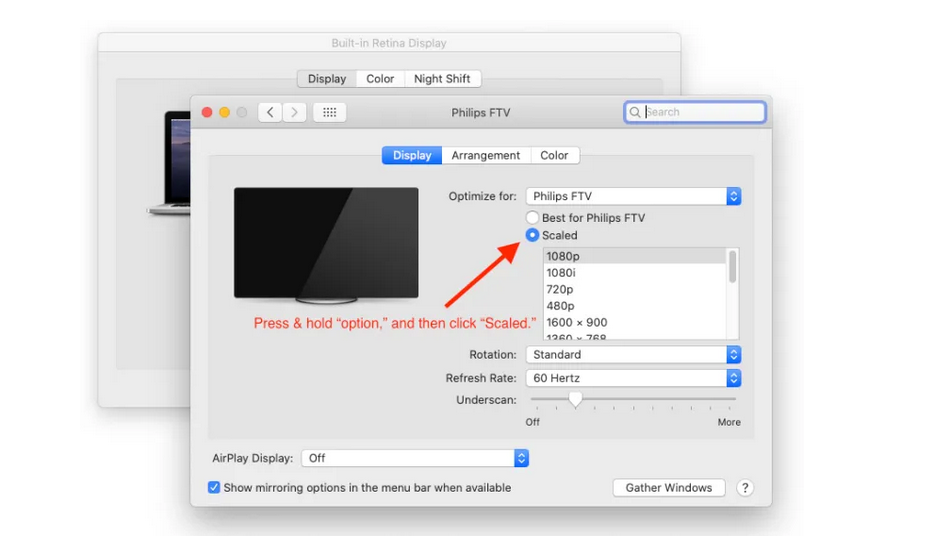
Not sure, but should you not press a combination of keys to get more possible resolutions?

Reply
Reply Cancel
0 0 on 22-06-2022
joevt

Native resolution in Monterey 12.4 works fine for me. I’m using Mac mini 2018.

Hold Option key, click “Scaled”, and select “Show all resolutions”. Or try SwitchResX.

Insert Image Size must be less than < 5MB.
Save Cancel
Show more replies
Reply
Reply Cancel
Login to Reply
Insert Image Size must be less than < 5MB.
Reply Cancel
  • All Posts
  • Following Posts
  • Blog
Copyright 2025 Club 3D B.V.