

Hi Kahless, the biggest update in the last firmware (compared the the version that your Adapter will have) has to do with reading EDID info coming from TV’s. This could be a problem mainly with Vizio tv’s. I do not expect you to need the firmware update looking at your hardware.
Here’s my standard checklist:
* Color Depth (often default set to 16 bits or even 32 bits) need to be set to 8 bits (when running 4:4:4).
What are the 4K formats supported by the adapter ?
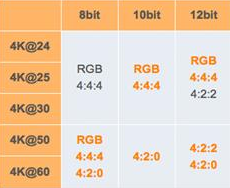
* Make sure the HDMI cable you are using can do HDMI2.0 or 18Gbps.
Sound a bit “easy” but many cable do actually not support the full bandwidth, certainly not cables longer than 3 meters …
* On many TV’s you need to turn on “UHD Color” or “Advanced (Color) Setting” manually in the settings of your TV for the HDMI port to which your pc is connected.
* Also it could help when connecting 2 screens, to set the screen connected thru the Adapter as second/secondary screen
* I strongly advise you to make a custom resolution, set resolution to 3840×2160 at 60Hz and set Timing standard to CVT-RB (reduced blanking)