
• All
  • Members Lounge
  • USB Type C
  • Docking Station
  • MST Hub
  • USB Graphics
  • Adapters and Cables
    • DisplayPort 1.4 to 4K120Hz HDMI Adapter
  • Graphics cards
    • R9 Series
      • R9 Fury Series
      • R9 390 Series
      • R9 380 Series
      • R9 290 Series
      • R9 280 Series
      • R9 270 Series
    • R7 Series
      • R7 300 Series
      • R7 260 Series
    • R5 Series
    • Others
    • HD 7000 Series
  • Technology
  • Market Place
    • Hot Deals
    • For Sale or Trade
  • Warranty questions
  • Never Settle Campaign
  • News

Club 3D Insights

  • Unfollow
  • Follow
  • Profile
  • Logout

CAC-1085 crashing pc!!

Updated on 12-07-2020 in Adapters and Cables.
  • Close
  • Delete
14 0 on 08-07-2020
DJanssen

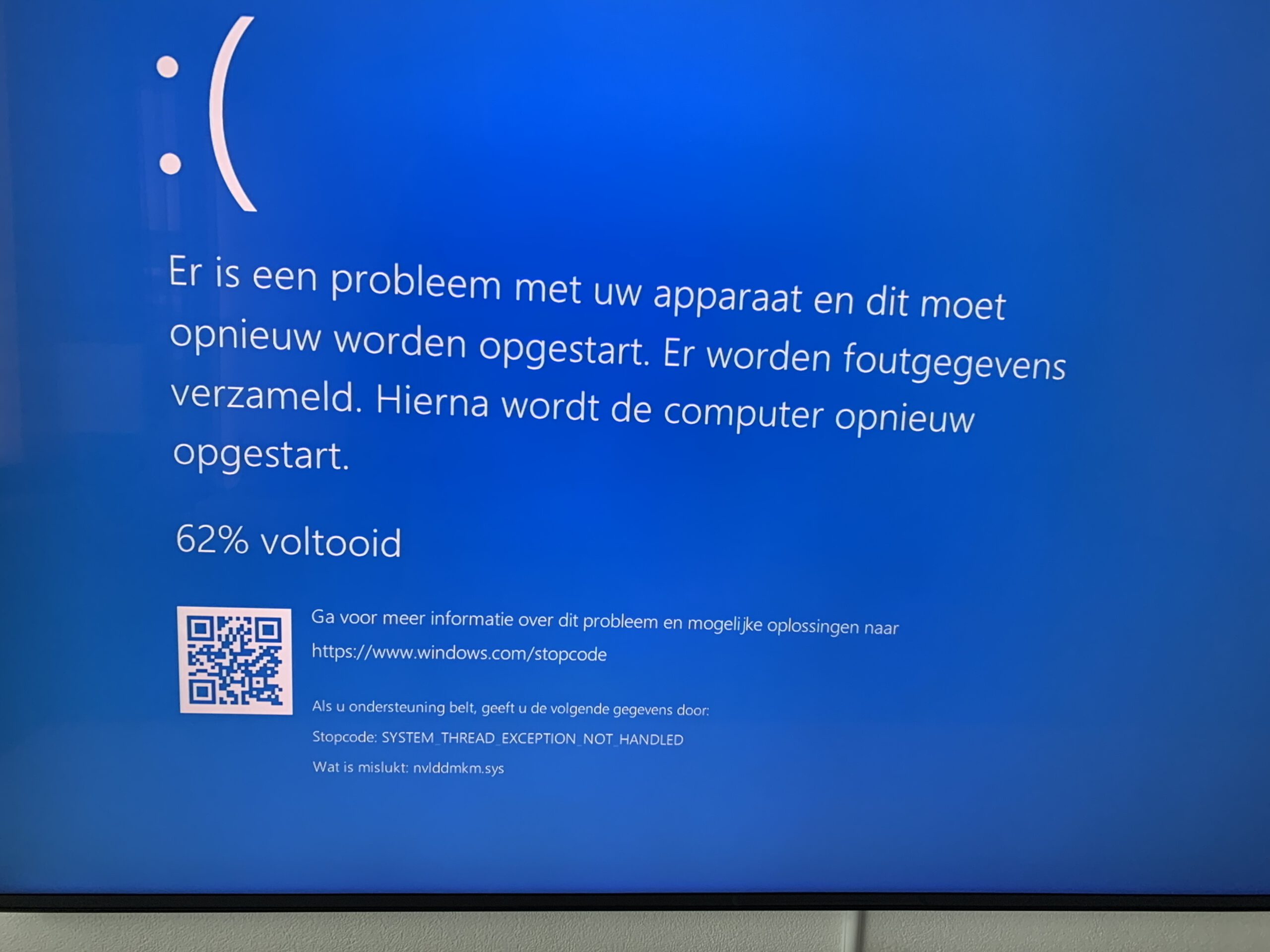
I have the CAC-1085, Nvidia RTX 2080 and a Samsung q900r. If I use the CAC-1085 my pc dos crash, when I place it between the Nvidia en de hdmi 2.1 of my tv.

Looks like there is something going wrong whit the Nvidia drivers, any one else problems whit the cac-1085?

Insert Image Size must be less than < 5MB.
Save Cancel
Reply
0 0 on 08-07-2020
net200777

Just unlpug it and try again

Insert Image Size must be less than < 5MB.
Save Cancel
Show more replies
Reply
Reply Cancel
0 0 on 08-07-2020
DJanssen

Did that, stil wil not work😭

Insert Image Size must be less than < 5MB.
Save Cancel
Show more replies
Reply
Reply Cancel
1 0 on 08-07-2020
Ravenmaster

Plug the adapter’s USB power cable into a stand-alone wall charger or a different USB port. Your motherboard might have a faulty USB port caused by 1 bent pin on the CPU socket

Insert Image Size must be less than < 5MB.
Save Cancel
Show more replies
0
DJanssen

Have in a stand-alone wall Charger. It works fine until I use the hdmi 2.1… if I use hdmi 2.0 poort on the tv it works great.

Reply
Reply Cancel
3 0 on 09-07-2020
Pittyh

does the samsung have hdmi2.1 ports?

Insert Image Size must be less than < 5MB.
Save Cancel
Show more replies
0
DJanssen

It has 1, hdmi 2.1 port

0
Ravenmaster

What model is your TV?

0
DJanssen

Samsung 65q900 

Reply
Reply Cancel
3 0 on 09-07-2020
DJanssen

New Nvidia drivers are out today. De pc stopt whit chraching. But now he see the tv but wil not display any thing. This looks like the Nvidia drivers sets the output to 8k… and the cac 1085 can’t Handel that… 😭

Insert Image Size must be less than < 5MB.
Save Cancel
Show more replies
0
Ravenmaster

The CAC-1085 is Displayport 1.4 to HDMI 2.1 adapter. Displayport 1.4 has a max bandwidth of 32Gbps and HDMI 2.1 has a max bandwidth of 48Gbps. This means that the adapter must always use the lowest common denominator in order to function. Which means the adapter’s max bandwidth is 32Gbps.

With 32Gbps of bandwidth, you should be able to get a picture running at 4K 120hz 8-bit 4:4:4 chroma. Or 4K 120hz 10-bit 4:2:2 chroma. Or 8K 60hz 8-bit 4:4:4 chroma.

Which HDMI port are you using on the TV? The Samsung 65Q900 has only one 8K HDMI port. According to RTings.com, the TV’s HDMI port 4 is the advanced one (not HDMI port 1).

0
net200777

Or 4k 96hz 10bit 444. But it doesn’t work for some reason

0
Pittyh

New Nvidia drivers are out today. De pc stopt whit chraching. But now he see the tv but wil not display any thing. This looks like the Nvidia drivers sets the output to 8k… and the cac 1085 can’t Handel that… 😭

From DJanssen

If software is giving you bluescreens, then you’d better go back to the drawing board, check hardware and reinstall everything.

reinstall windows and nvidia drivers.

Reply
Reply Cancel
0 0 on 11-07-2020
rhabarber

I have exactly the same problems on my Samsung Q950R… i think we need to wait for tv firmware update. 4096×2160@120Hz is the only resolution that works for me with the adapter.

Insert Image Size must be less than < 5MB.
Save Cancel
Show more replies
Reply
Reply Cancel
0 0 on 12-07-2020
Ravenmaster

My adapter came today and i’m using it with a RTX 2080Ti and a LG SM9000 Nanocell TV. The SM9000 is equipped with 4 full 48Gbps HDMI 2.1 connectors and i’m using Belkin 48Gbps HDMI 2.1 cables to all my devices (PC/Nintendo Switch/4K UHD Blu Ray Player and Denon AVR-X1600H eARC compatible receiver).

The CAC-1085 gives me the option to do 4K 120hz with Full RGB @ 8-bit and 10-bit colour. I can also do 12-bit @ 4:2:2 chroma sampling. 

The trouble is, every time i switch any settings in the Nvidia Control Panel, the screen goes black and it does not come back on again until i have pulled out the USB power cord from the adapter then plugged it back in again. 

It’s annoying to have to do that but it gets it working again. Also, if i turn HDR on, the same thing happens. Screen goes black and picture won’t come back on until i have pulled the adapter’s power cord and plugged it back in. There seems to be something wrong with the handshake. Similarly, when i’m in HDR mode and try to switch back to SDR mode, it happens again. Black screen until i power down the adapter and power it on again.

It’s nice while its working, I do admit. Text is super clear at 4k with Full RGB. And 120hz means there’s no ghosting during motion or animations which is great. I just wish I didn’t have to fiddle with the power cord so often.

Insert Image Size must be less than < 5MB.
Save Cancel
Show more replies
Reply
Reply Cancel
Login to Reply
Insert Image Size must be less than < 5MB.
Reply Cancel
  • All Posts
  • Following Posts
  • Blog
Copyright 2026 Club 3D B.V.