• All
  • Members Lounge
  • USB Type C
  • Docking Station
  • MST Hub
  • USB Graphics
  • Adapters and Cables
    • DisplayPort 1.4 to 4K120Hz HDMI Adapter
  • Graphics cards
    • R9 Series
      • R9 Fury Series
      • R9 390 Series
      • R9 380 Series
      • R9 290 Series
      • R9 280 Series
      • R9 270 Series
    • R7 Series
      • R7 300 Series
      • R7 260 Series
    • R5 Series
    • Others
    • HD 7000 Series
  • Technology
  • Market Place
    • Hot Deals
    • For Sale or Trade
  • Warranty questions
  • Never Settle Campaign
  • News

Club 3D Insights

  • Unfollow
  • Follow
  • Profile
  • Logout

csv-1566 iSSUES

Updated on 25-01-2024 in USB Type C.
  • Close
  • Delete
8 0 on 15-08-2022
jsapper

Having two issues with a CSV-1566 docking station connected to an HP laptop. 

Issue 1:  If the laptop goes to sleep, when you wake it up, it doesn’t recognize the docking station. You have to power the docking station off and on to get the laptop to recognize it. Is this a know issue,  and is there a solution?

Issue 2: The laptop doesn’t seem to like powering on when connected to the docking station. Have tried pushing the power button multiple times, but it won’t power on. As soon as you disconnect the USB-C cable, it powers on. Is this a known issue? Is there a solution?

I have applied the latest driver that is posted on the Club 3D website.

Thanks for your help!

Insert Image Size must be less than < 5MB.
Save Cancel
Reply
6 0 on 16-08-2022
Baak

Are your drivers and BIOS up to date?

Please follow the below link to determine a BIOS update:

https://support.hp.com/us-en/document/ish_5789324-5789376-16


Insert Image Size must be less than < 5MB.
Save Cancel
Show more replies
0
jsapper

Laptop is an HP 255 G8 Notebook. Double checked and it is at the latest BIOS level and drivers are up to date.

0
Baak

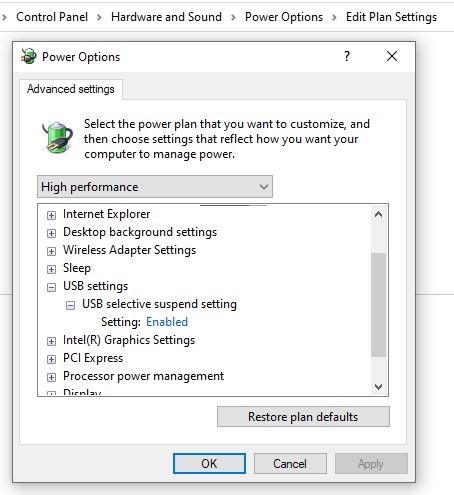
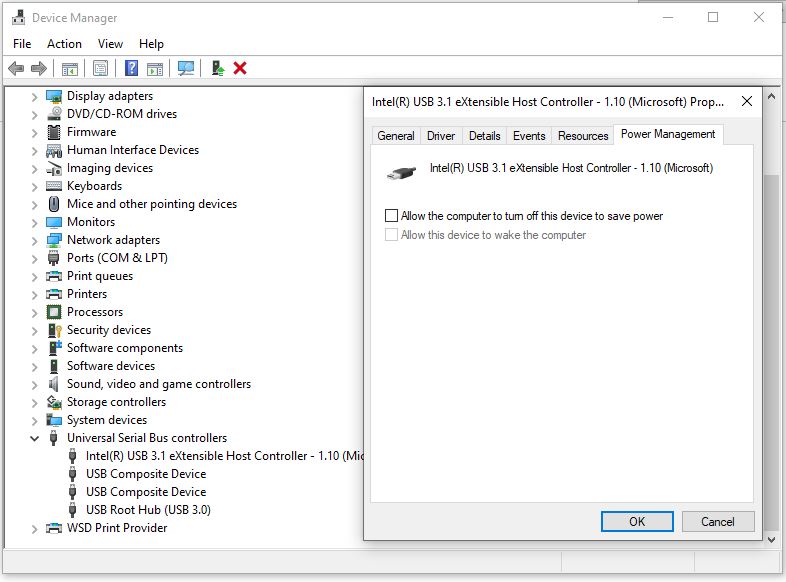
What are the power settings of the USB?

Try to configure what your laptop does after going to sleep.

0
Baak

Or try using Hybernate mode? Not sure if that will work but it could!

Follow below link to enable Hybernate mode:

https://www.groovypost.com/howto/enable-hibernate-mode-windows-10/


0
JJ

Did there suggestions resolved the issue?

We have multiple customers with the CSV-1566 docks having issues like this and others and are needing resolution soon.

0
JJ

Other issues include, dock losing connection to monitors during Teams meetings.
3rd monitor not wanting to connect until you either unplug the power from the dock and/or sometimes the display cable whether HDMI or DP.

0
Baak

Have you tried the above suggestions JJ?

Reply
Reply Cancel
Login to Reply
Insert Image Size must be less than < 5MB.
Reply Cancel
  • All Posts
  • Following Posts
  • Blog
Copyright 2025 Club 3D B.V.