Hi All,
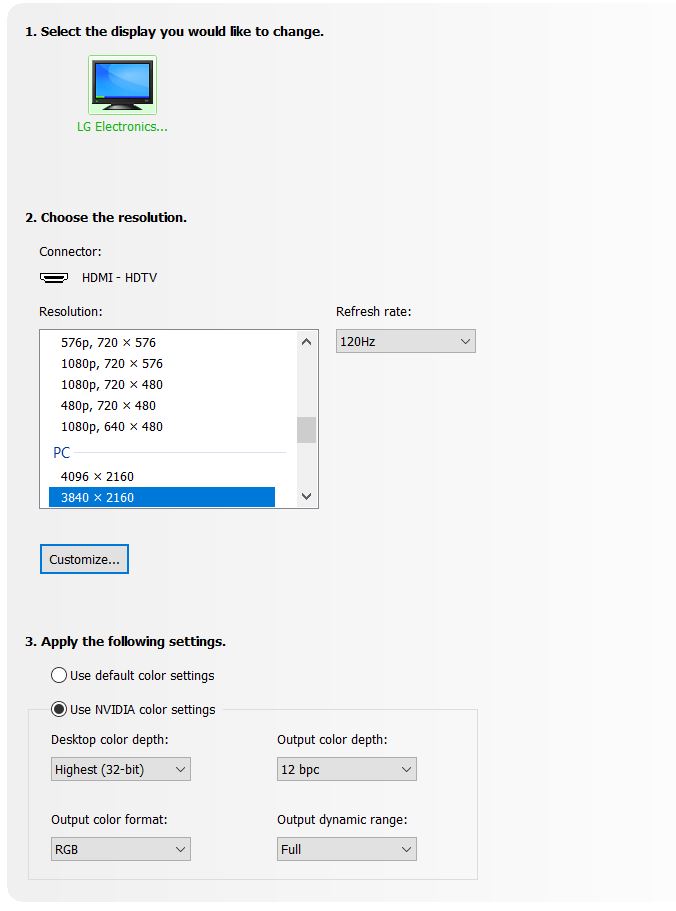
Does the CAC-1085 allow 4k@120hz with 4:4:4 ? or does it have to be 4:4:2?


It should allow up to 4K 144 Hz HDR 10-bit YCbCr444 and RGB, if not 12-bit. You can already do 4K 120 Hz SDR 8-bit YbCr420 on HDMI 2.0 if the TV supports it.

No i have a 2080ti, so it will be using DSC, can the CAC-1085 transport 4K@120 4:4:4?
With DSC, the 2080ti should be able to output 4k@120hz 4:4:4 (and more), but you need to make sure your display device also supports DSC. For example, the 2020 LGs don’t support DSC, while the 2020 Samsung TVs with HDMI 2.1 do.
Nope, DSC is an optional feature in HDMI 2.1. Vincent Teoh did a video where he looked at the EDID of a C9, and it had no mention of inputs taking DSC, where as a Samsung Q80T did. Scroll to ~15:15.
With DSC, the 2080ti should be able to output 4k@120hz 4:4:4 (and more), but you need to make sure your display device also supports DSC. For example, the 2020 LGs don’t support DSC, while the 2020 Samsung TVs with HDMI 2.1 do.
It does not need DSC to output 4K 120 Hz HDR 8-bit with dithering RGB / YCbCr444. There’s no need for 10-bit and DSC for HDR.
HDR requires 10 bit.
No it doesn’t. Consoles and Blu-ray players which output subsampled YCbCr420 need 10-bit to prevent banding. A YCbCr444 / RGB source with full colour sampling can perform dithering at 8-bit and surpass the perceived banding of even 10-bit. That’s why you can run HDR 8-bit RGB / YCbCr444 on a PC which is vastly superior to subsampled 10-bit in games and text.

Correct me if I am wrong, but shouldn’t DSC be only required between GPU and adapter?
The way I see it, to convert DP 1.4 to HDMI 2.1 signal you need more bandwidth than DP 1.4 can deliver in some cases, hence the need for DSC. From adapter to TV HDMI 2.1 should have enough bandwidth.
I don’t think the adapter is acting as a converter but rather a passthrough of DSC-compressed signal. Otherwise it wouldn’t be able to obtain 8k @ 60hz, as that resolution and framerate can’t be obtained with an uncompressed signal over HDMI 2.1.


Some early feedbacks from the first guy to have a hand on the adapter ( with a CX 48 )
I quote from Hardforum CX 48 owner thread Page 50 :
Ok – just received and tested stuff for an hour with the CAC-1085 DP1.4 to HDMI2.1 adapter. At this point I CANNOT recommend this product. It’s flawed running on my 2080TI and CX48. This is what i send to Club3d Support:
Just switched back to HDMI – Text is better readable… there is something wrong with the full RGB / HDR that causes text to be fuzzy.

Thats not a fair review – the CX48 only allows 40Gb of bandwidth is not a full HDMI2.1 specs
Running 4K120Hz at 444 RGB 10Bits goes above the possible resolutions the TV allows. The C9 is allowing 48Gb but the new gen TVs from LG from 2020 are limited to 40Gb
Club3D has tested this with the C9, LG could increase to 48Gb with a firmware update – but thats beyond Club3D ability.
Good point, but LG CX with 40 gb, should be sufficient to get 4k 120 8 bits 4.4.4 though ?
Thanks, good to know the 2080ti and LG C9 will work 😀
So i can expect to leave my desktop on 4K@120 4:4:4 10 bit HDR And should not get a lot of switching like this guy?
What do you set your NVidia CPanel to? RGB or 4:4:4 ?
Is 4K@120 and 4:4:4 option even available on nvidia cpanel?
Now answer my PM Please i need one !!!!
Haha can’t get one anywhere.
HDR requires 10 bit colour
No it doesn’t. Consoles and Blu-ray players which output subsampled YCbCr420 need 10-bit to prevent banding. A YCbCr444 / RGB source with full colour sampling can perform dithering at 8-bit and surpass the perceived banding of even 10-bit. That’s why you can run HDR 8-bit RGB / YCbCr444 on a PC which is vastly superior to subsampled 10-bit in games and text.
This adapter should allow 4K 120 Hz HDR 8-bit with dithering RGB / YCbCr444 on Windows which is satisfactory. Ideally it would allow 10-bit RGB / YCbCr444 so you don’t need to use 8-bit with dithering, but it’s not confirmed yet whether this works on the CX.
Yes HDR requires 10 bit colourspace.
Were talking 16 million colours vs 1 billion colours, you can’t call it HDR if it’s 8bit lol
Bottom line —8-bit video is completely incapable of delivering HDR as it is by default of limited dynamic range, regardless of what special metadata accompanies it. Claiming 8-bit HDR is like boasting 5.1 channel is Atmos Audio. A 10-bit signal is an essential minimum for HDR video, whereas 12-bit buys a ton of headroom and an even greater dynamic range.
Yes HDR requires 10 bit colourspace.
Were talking 16 million colours vs 1 billion colours, you can’t call it HDR if it’s 8bit lol
Bottom line —8-bit video is completely incapable of delivering HDR as it is by default of limited dynamic range, regardless of what special metadata accompanies it. Claiming 8-bit HDR is like boasting 5.1 channel is Atmos Audio. A 10-bit signal is an essential minimum for HDR video, whereas 12-bit buys a ton of headroom and an even greater dynamic range.
You’ve been misinformed by marketing. All the points you listed are false. They’re “true” only for low quality 4:2:2 or 4:2:0 subsampled signals that Blu-ray players use. You cannot apply dithering to a subsampled signal. A dithered 8-bit signal is visibly superior to a subsampled 10-bit signal – no contest. Banding is equal or superior depending on the dithering quality. Colour resolution is superior, objectively and visibly, in text and graphics.
Yeah no, i think you’ve been misinformed
Quoted from David Meyer, Ceo of Cedia
• Society of Motion Picture & Television Engineers (SMPTE) Professional member
• Institute of Electrical and Electronics Engineers (IEEE) Professional member
Specialities: Research & interpretation of home technologies, with established speciality in video and connectivity, namely HDR, HDMI interoperability, compliance & bandwidth.
Ahaha, i think i’ll take his word over some random poster 😛 Sorry.
He’s talking about 8-bit vs 10-bit in the industry i.e. 8-bit (typically 4:2:0) used for SDR vs 10-bit (4:2:0) used for HDR. This is the context in which those statements are true.
There’s no mention of RGB / YCbCr444 or dithering. An 8-bit RGB / YCbCr444 signal with dithering is superior to any subsampled (4:2:2 or 4:2:0) 10-bit image.
The range of values in a 10-bit signal is irrelevant. Talking about “stops” like a camera is meaningless. How values map to brightness is determined by the PQ EOTF and it’s irrelevant whether it came from a “big number” 10-bit value or a dithered 8-bit signal with alternating “small numbers”.
Number of colours (millions vs billions) is irrelevant. The colour perceived by the eye depends on the effective wavelength emitted by the display. The same wavelength corresponding to a discrete 10-bit value is achieved by a 10-bit signal on a 10-bit panel, a 10-bit signal on an 8-bit + FRC panel, or 8-bit with dithering RGB / YCbCr444 signal on a plain 8-bit panel. The downside to dithering / FRC is the temporal colour resolution is reduced in half, which is 60 Hz on a 120 Hz panel. Movies are 24 Hz, so there is no loss. On the desktop and in games, the eye cannot detect temporal colour change even at 60 Hz. It still displays 120 unique frames per second.
No worries mate, i don’t mean to be rude, but i don’t really care, all i want is windows 10 on my LG C9 running at 4K@120 in 4:4:4 or RGB, with HDR on. That’s all i want, it’s not much to ask is it ? 😛
You get HDR on Windows with 4K 120 Hz HDR 8-bit with dithering RGB, which is supported by the adapter, C9, and CX.
We don’t know if 4K 120 Hz HDR 10-bit 4:4:4 / RGB is supported by the adapter / CX at 40 Gbps / C9 at 48 Gbps, because it needs DSC at the DisplayPort 1.4 end, but it is indistinguishable from 8-bit with dithering so it doesn’t matter.
The concept of using dithering to convert an 8-bit signal to something that looks like 10-bit is interesting. However, I don’t think 8-bit + dithering is implemented by any current or planned sources, so isn’t it all of this moot? A better solution, especially now since HDMI 2.1 and DisplayPort 2.0 are around the corner, is to just increase your bitrate by 20% and go 10-bit. I doubt anyone would implement this dithering solution just to work within some old bandwidth constraints.

You get HDR on Windows with 4K 120 Hz HDR 8-bit with dithering RGB, which is supported by the adapter, C9, and CX.
We don’t know if 4K 120 Hz HDR 10-bit 4:4:4 / RGB is supported by the adapter / CX at 40 Gbps / C9 at 48 Gbps, because it needs DSC at the DisplayPort 1.4 end, but it is indistinguishable from 8-bit with dithering so it doesn’t matter.
Think about this Adapter, it is Displayport 1.4 to HDMI 2.1. Displayport 1.4 is 32Gbps max bandwidth. HDMI 2.1 is 48Gbps max bandwidth. Therefore, the Adapter will always drop down the lowest common denominator to function. Which means it can only do 32Gbps max bandwidth (capped by the Displayport 1.4 spec).
But still, 32Gbps is enough bandwidth to do 4k 144hz 10-bit 4:4:4 chroma with DSC. Or 4k 120hz 8-bit RGB without DSC.
The concept of using dithering to convert an 8-bit signal to something that looks like 10-bit is interesting. However, I don’t think 8-bit + dithering is implemented by any current or planned sources, so isn’t it all of this moot? A better solution, especially now since HDMI 2.1 and DisplayPort 2.0 are around the corner, is to just increase your bitrate by 20% and go 10-bit. I doubt anyone would implement this dithering solution just to work within some old bandwidth constraints.
Windows 10 has supported 8-bit RGB / YCbCr444 with dithering for HDR since the beginning. It automatically uses dithering when running in a full colour sampling mode like RGB / YCbCr444. This is the ideal mode for HDR monitors over DisplayPort 1.4. The banding and colour gamut is indistinguishable from 10-bit YCbCr422, and you get full colour sampling with desktop quality text and graphics. Subsampling looks terrible on the desktop with fringing on everything.
It’s only consoles and Blu-ray players which force you to use 10-bit YCbCr420 for HDR.
Dithering cannot be applied to a colour sub-sampled signal, which is why you can’t get HDR at 4K 120 Hz 8-bit with dithering YCbCr420 on HDMI 2.0 on the CX. However you can do HDR at 4K 60 Hz 8-bit with dithering RGB instead of dropping down to 10-bit YCbCr422.


Max 10bit 444 98hz.
Max of what? the CX or the C9?
This is all very confusing, even the Club3d guys can’t give a straight answer.
Can i do 4K@120 Hz with 4:4:4 HDR/10Bit on my 2080ti and lg C9 with the cac-1085?
It’s a pretty straightforward question, but everyone seems to give different answers.
@Pittyh assuming your C9 doesn’t have DSC, you cannot do 4K @ 120hz 4:4:4 10-bit because that is beyond the bandwidth of DisplayPort 1.4. From what @Monstieur said, your best option within your bandwidth constraints is to use 8-bit + dithering, as this has the least impact on perceived quality (although I don’t know how to enable it exactly).
If your C9 has DSC then great you should be good to go, but the research so far suggests that it doesn’t. You might want to reach out to LG if you want a definitive answer.
4K @ 120hz 10 bit color uncompressed signal is supposed to be 32.27 Gbit/s
Display Port 1.4 max bandwidth is supposed to be 32.40 Gbit/s using HBR3 (High Bit Rate 3)
So it looks like it fits within the limit, but just…
I don’t know if those limits include data rates or just listing max transmission rates.
Nope, you’re not factoring in the 8/10 encoding rate in DisplayPort 1.4. This means that it uses 10-bits to transmit 8-bits of data. So your 32.4 Gbps max bandwidth turns into a 25.9 Gbps max *data rate*. This encoding is also separate from any blanking overheads.
But also if you look at the product page it states:
This product is SPECIFICALLY designed to work with the latest Graphics Processing Units (GPU’s) which supports DSC 1.2
and
With its DP1.4 DSC video compression technology, this adapter is able to convert DP1.4 video signals to HDMI™2.1, supporting video display resolutions up to 8K (7680 x 4320)@60Hz **
and
** Please update your Graphic drivers on your PC and make sure that DSC1.2 is supported on your devices to support the these resolutions/refresh rates!
And on the nvidia 20 series wiki:
DisplayPort 1.4a with Display Stream Compression (DSC) 1.2
So 4k@120 with 4:4:4 HDR using DSC fits within the 25.92 limit. So does 4:2:2
Only 20 series nvidia cards have DisplayPort 1.4a with Display Stream Compression (DSC) 1.2
Yep that’s exactly what happens, i’ve worked it out
Nvidia display port 1.4 HBR3 = 32.27gbit/s but with DSC -> fits in HBR3 25.92Gbit/s -> adapter then converts this 25.92Gbit/s signal to HDMI 2.1
So it’s your choice use 4:2:2 which disables DSC, and you get chroma subsampling (bad for pc text)
Or set 4:4:4/RGB and DSC kicks in and will compress the 32.27 to fit within the 25.92 limit.
They are both the same bandwidth and will fit into 25.92 – the max data output of dp1.4
Look at the dp1.4 HDR Video with Compressions table on wiki https://en.wikipedia.org/wiki/DisplayPort
@Pittyh, I’m not sure what your point is? The adapter will convert a DP 1.4 signal to an HDMI 2.1 signal; this signal can be uncompressed or use DSC. However, DSC won’t be used unless both your source can do DSC compression and your display can do DSC decompression. The adapter does NOT convert a DSC stream into an uncompressed stream.
If either your source or your display can’t do DSC, then you’re limited to 4K @ 120hz 4:4:4 8-bit for an uncompressed signal (and the limitation is on the DP 1.4 side).
If BOTH your source and display can do DSC, then you should be able to get higher resolutions/framerates/color depth, as DSC can do ~3:1 compression ratio. 8K @ 60hz is roughly 2x the data rate of 4K @ 120hz, so that’s possible, but only with DSC.
You stated you have a C9, so your display likely doesn’t support DSC.
It supports DSC compression in the DP 1.4 stream input and HDMI 2.1 output, but it’s not claiming that it does the decompression.
Think about it: if it were converting DSC to non-DSC, it wouldn’t be able to support 8K @ 60hz. That resolution and framerate requires 49.6 Gbps uncompressed, but HDMI 2.1 only supports a 42.67 Gbps data rate. So how would it be possible?
FYI, here’s a data rate calculator in case you need it:
Amazon question about product.
Does this require a tv/screen that supports dsc, or is that just required for the source?
No it does not require the screen to support DSC the adapter will work as a decoder or bypass when the source is supporting it .
Interesting, still very vague though 😛
Also i sent an email to club3d and got this response:
Hi can you please clarify some details regarding the CAC-1085?
If I have a 2080ti and a LG C9
Can I enable 4K@120 hz with 4:4:4 Colour and 10bit HDR?
Or is it 8bit?
Does the adapter take the DP1.4a DSC signal and uncompress it to hdmi2.1?
So 25.92 Gbit/s signal from the video card to the adapter, uncompress then convert to 32.27Gbit/s hdmi2.1 from the adapter to the HDMI2.1 port?
There is a lot of talk and confusion going around, some clarification would be great
Regards,
—————————
Hi ****,
Yes the adapter is able to support 4K@120Hz with 444 and 10Bit
The adapter is able to Bypass and Decode
It does note Encode DSC Compression
With the LG C9 the support for 48Gbps full HDMI is there. Please note that newer LG TV from 2020 does not support fully the 48Gbps but only 40Gbps so limitations might be on the supported devices.
We hope this answer your questions.
Best regards
Club3D Support
I’m guessing it has something to do with this from wiki
Only a portion of DisplayPort’s bandwidth is used for carrying video data. DisplayPort versions 1.0–1.4a use 8b/10b encoding, which means that 80% of the bits transmitted across the link represent data, and the other 20% are used for encoding purposes. The maximum bandwidth of RBR, HBR, HBR2, and HBR3 (6.48, 10.8, 21.6, and 32.4 Gbit/s) therefore transport video data at rates of 5.184, 8.64, 17.28, and 25.92 Gbit/s.
Good news for NVidia 1080TI and LG C9 with this adapter: Somebody on avsforums tried this combination (https://www.avsforum.com/forum/40-oled-technology-flat-panels-general/3123168-2019-lg-c9a-e9-dedicated-gaming-thread-consoles-pc-37.html#post59892538)
And was able to get up to 4k/120Hz/422/10bit. So 120Hz HDR is finally possible, even with an older 1080TI! Altough with reduced 422 color space.

I was hoping this would convert the DSC and not use it passively (which is useless for us C9/CX owners) Oh well 4k/120Hz/422/10bit/HDR or 4k/120Hz/444/8bit/HDR dithering will have to do for now. Good to know that 422 works though, I’ve been worried it wouldn’t work because at 4k the TV won’t accept 420.
here is the amazon link, available in one week. it was available to order june the 26th but went out of stock so fast that i missed it ….
Hmm it’s now unavailable with no planned stock date. Hope they didn’t find a critical flaw!
https://www.amazon.com/gp/product/B08BC8LV3M/ref=ppx_yo_dt_b_asin_title_o01_s00?ie=UTF8&psc=1
Finally in stock 🙂 Go ahead!
So my CAC-1085 arrived today. I’m currently using it with a RTX 2080Ti and a LG 55″ SM9000 Nanocell TV (the one equipped with four full bandwidth 48Gbps HDMI 2.1 sockets which also uses the Alpha 7 gen 2 processor – same as the B9 OLED).
The adapter feels very much like a prototype rather than a finished product. I can get 4K 120hz + 8-bit or 10-bit Full RGB color. I can only do 4K 120hz + 12-bit with 4:2:2 chroma sampling. I prefer 4K 120hz 10-bit Full RGB. It seems to give the clearest text and most vibrant colors. There is also no ghosting or motion blurring @ 4K 120hz which is really nice.
The adapter does not support G-sync or Freesync but it does support bog standard V-sync to prevent tearing.
The one huge caveat to this adapter is that its handshake between the graphics card, adapter and TV seems to be very brittle. And what I mean by that is, whenever I switch between HDR to SDR or vice versa, the screen will go black and stay black until I pull the USB power cord out of the adapter and put it back in again.
The same thing happens after I close down a game when i’m finished playing it. The transition from game screen to the desktop screen once again turns the screen black until I power down the adapter and switch it back on again.
It’s really annoying to have to keep on powering it off and on but when it’s working, everything looks so good.
FYI, I’m using a 48Gbps Belkin HDMI 2.1 (2m) cable to connect.
Another thing I noticed is that in SDR mode, I only need to set the TV’s colour setting to 50. But in HDR mode, colours look very washed out until I turn the TV’s colour setting up to 80-85 so that colours pop as much as they do in SDR mode.
For those LG SM9000/B9/C9/CX users out there, in the Picture Settings, I’m using Game Mode and all 4 HDMI sockets have HDMI Ultra HD Deep Color turned on. In the Input Home Dashboard I’ve also edited the HDMI socket hooked up to the Club3D Adapter/GPU to ‘PC Input’.
Why are you switching between HDR and SD? can’t you just turn on HDR in windows and leave it on?
If i’m in SDR and i turn on HDR in windows 10, the screen goes black. So i have to pull out the adapter’s power cable and put it back in again to get a picture on the screen. If I don’t do that, the screen stays black. The trouble is, many PC games do not support HDR. So then the game will automatically switch to SDR. Then that causes a black screen. And once again i have to unplug the adapter’s power cable and pop it back in again to get the screen to come back on.
The CAC-1085 feels very much like an unfinished prototype. I REALLY hates switching from HDR to SDR or from game to desktop (and vice versa).
How did you get 4k120hz RGB 10Bbit? I assume 444?
No. The adapter is offering me 4k 120hz Full RGB @ 8-bit, 4K 120hz Full RGB @ 10-bit or 4k 120hz 4:2:2 Limited @ 8-bit/10-bit/12-bit. There is no 4:4:4 option and no 4:2:0 option.
But no matter which of those settings i choose, the damn thing is always losing signal and I am forced pull out the adapter’s USB power cable and plug it back in again to get an image back onto the screen.
If you can get full rgb, you can also get 4.4.4 . ( this is the same, only that one is converted live ) SDR 10bits 4k 120 full rgb 444 is really good and I cant wait to receive my adapter.
Question for the owners,
Do you notice a difference in mouse lag / input lag switching from 1440p 120Hz and 4k 120hz ?
Thanks!
If you can get full rgb, you can also get 4.4.4 . ( this is the same, only that one is converted live ) SDR 10bits 4k 120 full rgb 444 is really good and I cant wait to receive my adapter.
Question for the owners,
Do you notice a difference in mouse lag / input lag switching from 1440p 120Hz and 4k 120hz ?
Thanks!
The adapter is absolute garbage. It is constantly losing signal and giving me a black screen whenever i try to change any resolution settings in video game graphics menus. Sometimes I have to restart my PC just to get an image back on the screen. The CAC-1085 is a very flawed device and I wouldn’t be surprised if Club3D has to recall them all.

The adapter is absolute garbage. It is constantly losing signal and giving me a black screen whenever i try to change any resolution settings in video game graphics menus. Sometimes I have to restart my PC just to get an image back on the screen. The CAC-1085 is a very flawed device and I wouldn’t be surprised if Club3D has to recall them all.
1.That has nothing to do with BricoDepot1987´s comment.
2. Club3d is designing Cabels and adapters to bring a signal from A to B, every issue that you have is caused by the software of A and B. The fact that you need to restart your PC instead the adapter is the proof.
3. Wait for software updates of A and B cant be so hard, right? So lets chill…
4. It is summer , so go outside and watch some ti..
So After trying the CAC 1085 with C9 and SM9000,it works,
I can get 4k 120 full rgb 12 bits,
But since I dont care about changing from hdr to non hdr or switching resolutions, I dont have the issue that Raven is mentioning.
I keep my tv at 4k sdr at all time. ( Hdr is really overrated imo, it adds input lag and destroy the color accuracy anyway )
I was happy to find that the input lag at 4k 120 on the sm9000 is about 7 ms, which is better than the c9 / cX that will get you 11 ms.